


Have you been able to find a way to improve the jog dials for a quicker response? Its good enough out of the box, don't get me wrong, but it just doesn't respond as fast as say, 1200s or the NS7
Please share your settings and advice!
Please share your settings and advice!
Inviato Tue 22 Nov 11 @ 2:27 am
 apopsisdj
Yes you can improve the jog performance.
Please take a look here for details :
http://www.virtualdj.com/wiki/NS6.html
Please take a look here for details :
http://www.virtualdj.com/wiki/NS6.html
Inviato Tue 22 Nov 11 @ 6:26 am
 Charlie Wilson
No torq what do you expect.
Inviato Tue 22 Nov 11 @ 6:45 am
 The Lone Mixer II
1. Download register tool install
2 open find controller section
3 find default scratch latency
4 set to 1024
5 apply close and enjoy
6 peace
2 open find controller section
3 find default scratch latency
4 set to 1024
5 apply close and enjoy
6 peace
Inviato Tue 22 Nov 11 @ 10:08 pm
Wow. Registry tool is where it's at. That seemed to do the trick!
Inviato Wed 23 Nov 11 @ 12:40 am
 Caliente123
I have mine set like this. My macbook pro can handle really low latency levels so i have it set to 1 Ms. Not every laptop can handle the lowest settings so you may want to choose auto.
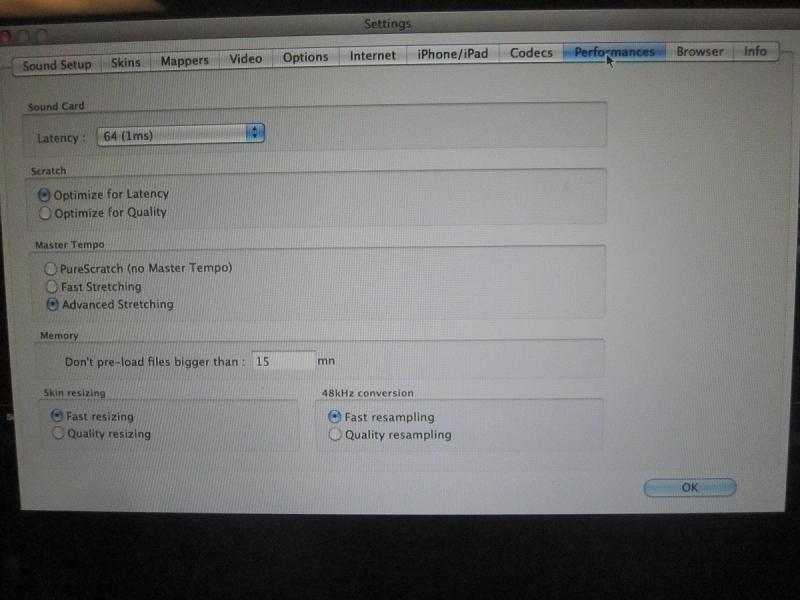
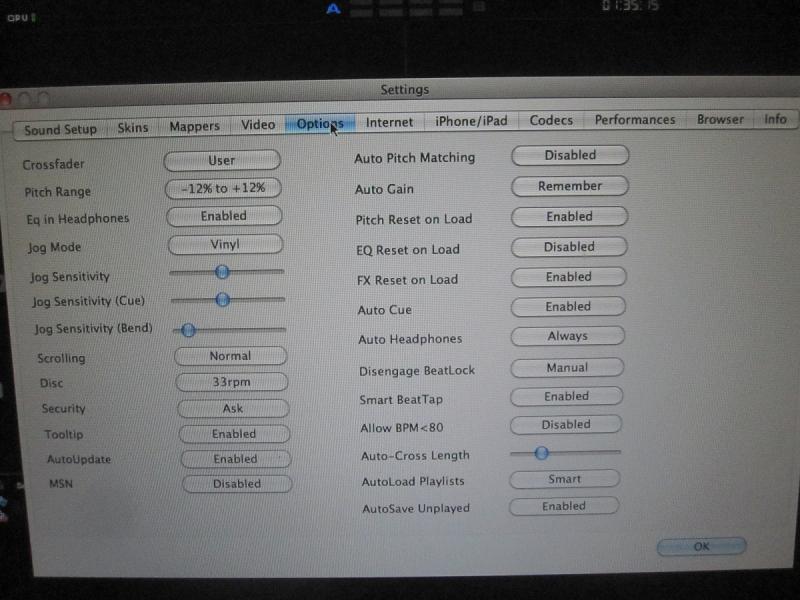
The Jog Sensitivity & Jog Sensitivy Cue, I have it set aliitle to the left from the center. Its actually under the " I " Of the word Vinyl when you look alittle up. The Jog Sensitivity bend is almost all the way to the left. The scratching responds really good. Its not going to be like a NS7 but, Its good for a non moving platter
The Jog Sensitivity & Jog Sensitivy Cue, I have it set aliitle to the left from the center. Its actually under the " I " Of the word Vinyl when you look alittle up. The Jog Sensitivity bend is almost all the way to the left. The scratching responds really good. Its not going to be like a NS7 but, Its good for a non moving platter
Inviato Wed 23 Nov 11 @ 12:54 am
pedromsr
Can you take a picture of your settings Registry Toolz. It scratchs horrible my ns7 i got a real version o vdj 7 but the seem to fast ... tried everything ovdj but wont work
Inviato Sun 26 Feb 12 @ 7:52 pm
 DjdedosTampa
hey guys i tried changing the sctratch value whit the registry tool but as soon i did that my left deck its not making any sound when i rewind the platter like in reverse, the right deck its fine, its just like if the back (rewind) audio its muted on the left deck, i see the movement on the indicator on the platter of the ns6 and in virtual dj but no audio camming out the mixer only on regular play back and scratching forward. note i didnt change anything else exept the scratch latency whit the registry tool to 1024. the bad thing is that i dont remember the default setting to bring it back the way it use to be.
Inviato Tue 28 Feb 12 @ 2:50 pm
 djlxpro
I know that you guys are talking about the NS6 but what are the best setting for the pioneer cdj 2000????
Inviato Tue 28 Feb 12 @ 3:46 pm
The Lone Mixer II
hope this helps....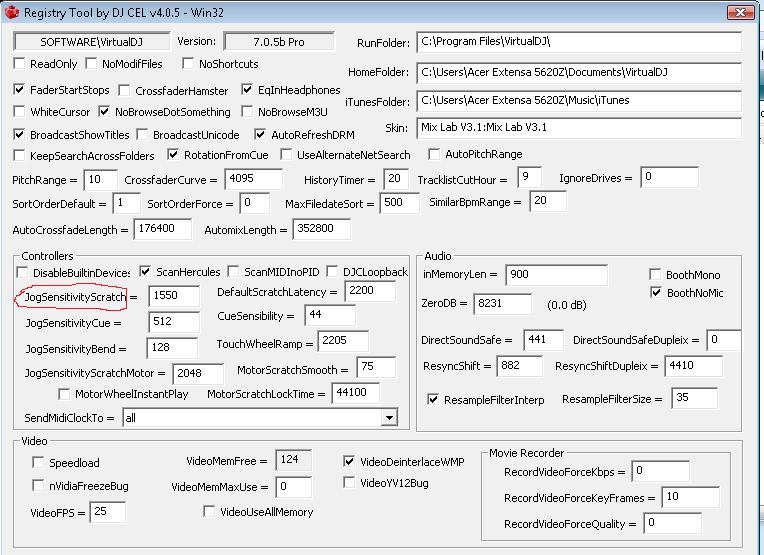
Inviato Wed 21 Mar 12 @ 3:11 am
djlxpro
Is that the setting for the ns6 or the cdj2000???
Inviato Wed 21 Mar 12 @ 3:22 am
 synthet1c
it's for any controller, but you actually want to change the "defualt scratch latency" whis is next to jog sensitivitely to "1020"
Inviato Wed 21 Mar 12 @ 3:59 am
Zzyzx
What do you think are the best settings for a mixtrack pro? I am having bag lag with the response time on the jog wheels.
Thank you.
Thank you.
Inviato Wed 28 Mar 12 @ 8:37 pm
 Rich08
I am also having the same problem where when I spin the deck back it mutes the sound but spinning it forward I do get sound. So when I scratch you only get the audio while scratching forward. I downloaded the registry and set all the settings like you guys said, still didn't solve the problem.
Inviato Thu 08 Nov 12 @ 3:54 pm
 SuperAceMan
Go into the scratch panel on the main interface and disable smart scratch. If smart scratch is enabled you will have no sound in reverse.
Inviato Thu 08 Nov 12 @ 4:01 pm