


 Brother_Funk

Hi!
I'm having trouble getting VDJ to see my two Allen&heath K3 units as two separate entities. Can anyone help?
I'm trying to map them so the K3 on the left controls deck 1 and 3, and the right K3 controls 2 and 4.
Despite making individual maps for both units they still mirror eachother. Eg one button the right hand K3 is programmed to play/pause deck 2, but continues to only play/pause deck 1.
I've tried every permutation of the settings in VDJ for K2/3 units (the settings where it says how many K2/3 units you have, what deck order they should be in (1,2,3,4 for example) and it still mirrors them.
I've opened both K3 units in the A&H controller editor and have given them both individual names and unique midi channels. In Windows device manager the computer sees them as 2 entities and their individual names are visible.
Both units seem to be working perfectly fine, no issues using them with Ableton.
Both are plugged directly into the back to the pc with proper data transfer cables. Not using crosslink.
I've searched the forums and tried every solution there and nothing has helped.
Please help, it's so frustrating and I am lost on what else to try.
Thank you.
Inviato Thu 29 Oct 26 @ 3:29 pm
 djdad

IMPORTANT. Leave the K3s to their default MIDI Channel 15
How have you connected the K3s ? Each device to a USB port of your computer or through XLINK to a A&H compatible mixer ?
You said you are not using XLINK, but there is no setting for the K3 to define how many devices you are using as it wasd with K2. Unless of course you are using the X-LINK method.
In case you use the USB-C connections for both, you could try the following..
You should see 2 x K3 devices in the CONTROLLERS tab of VDJ Settings. One device needs to be assigned to Decks 1,3,5,6 and the other one to 2,4,5,6. These options are not available in the drop down, but you can manually type those as per the following pics.
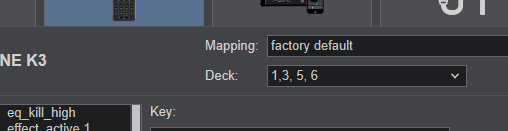
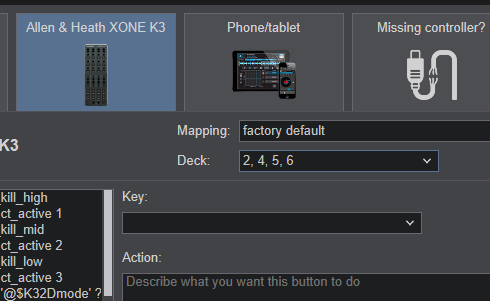
In VDJ Settings->Options->Controller subcategory, make sure the setting is set to 2 Decks.
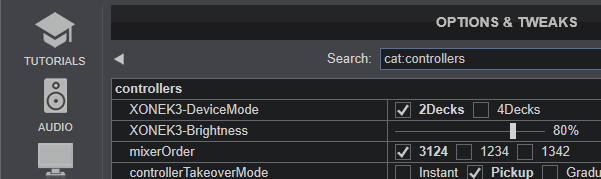
After that, you should be able to control Left Decks 1,3 with one device and Decks 2,4 with the other.
Note, it is not advised to use the XLINK with K3, as you will lose the RGB buttons coloring
How have you connected the K3s ? Each device to a USB port of your computer or through XLINK to a A&H compatible mixer ?
You said you are not using XLINK, but there is no setting for the K3 to define how many devices you are using as it wasd with K2. Unless of course you are using the X-LINK method.
In case you use the USB-C connections for both, you could try the following..
You should see 2 x K3 devices in the CONTROLLERS tab of VDJ Settings. One device needs to be assigned to Decks 1,3,5,6 and the other one to 2,4,5,6. These options are not available in the drop down, but you can manually type those as per the following pics.
In VDJ Settings->Options->Controller subcategory, make sure the setting is set to 2 Decks.
After that, you should be able to control Left Decks 1,3 with one device and Decks 2,4 with the other.
Note, it is not advised to use the XLINK with K3, as you will lose the RGB buttons coloring
Inviato Thu 29 Oct 26 @ 10:52 pm
Brother_Funk
hi again, I connected the K3S with usb leads in the back of the pc. No crosslink.
I'm still having trouble, VDJ is now seeing them both as 2 separate things and I'm now able to sign a unique mapping to each. However I am still having mirroring issues. I cannot map the buttons individually. When i map the play button for deck 2, then try and chose a button to map to play deck 4, it eventually defaults to deck 2 controls. Its scrambling deck 2 and 4 controls even if I use the deck2 or deck4 prefix. Its doing this despite pressing save. I've cleared the mapping for the entire set of buttons so nothing else should be interfering. The buttons just arent doing what im mapping them to do and im sure im using the vdj script correctly.
I wonder if theres an issue due to a clash with the extra settings I have in my menu-
XoneK3 device mode (2decks/4decks)
Xone96 K2 devices (1/2)
Xone96 K2SingleDeviceMode (2decks/4decks)
I HAVE MINE SET TO THIS BECAUSE ITS THE ONLY SETTING THATS STOPPING THE INDIVIDUAL DEVICES FROM MIRRORING EACHOTHER
XoneK3 device mode (2decks)
Xone96 K2 devices (2)
Xone96 K2SingleDeviceMode (2decks)
thank you for your help so far :)
Inviato Tue 03 Nov 26 @ 1:43 pm
djdad
Any action you map for a button, will apply to both decks/sides.
e.g. an action play_pause assigned to a button will play/pause Decks 2 and 4 without having to add any deck x in front.
If you wish a different action for the left/right sides, you need to use ..
which will execute play/pause on deck 2 and loop 4 on deck 4.
If you still having troubles, choose a button, map it as you want and let me know which one it is ( see https://virtualdj.com/manuals/hardware/allenheath/k3/controls2d.html ) , how it's mapped and how it behaves on any of the K32 to check here as well.
the Xone96 settings shouldnt matter if you plug your K3s on USB
e.g. an action play_pause assigned to a button will play/pause Decks 2 and 4 without having to add any deck x in front.
If you wish a different action for the left/right sides, you need to use ..
action_deck 2 ? play_pause : action_deck 4 ? loop 4 : nothing
which will execute play/pause on deck 2 and loop 4 on deck 4.
If you still having troubles, choose a button, map it as you want and let me know which one it is ( see https://virtualdj.com/manuals/hardware/allenheath/k3/controls2d.html ) , how it's mapped and how it behaves on any of the K32 to check here as well.
the Xone96 settings shouldnt matter if you plug your K3s on USB
Inviato Tue 03 Nov 26 @ 2:05 pm
Brother_Funk
This is how I've mapped the bottom two rows of buttons on the K3. Whatever is going on here is happening with all of the other buttons above too though.
row 11 far left - deck 2 loop half
row 11 middle left - deck 2 nudge -50ms
row 11 middle right - deck 4 loop half
row 11 far right - deck 4 nudge -50ms
row 12 far left - play deck 2
row 12 middle left - sync deck 2
row 12 middle right - play deck 4
row 12 far right - sync deck 4
Once I've typed those in and moved on to other buttons the mapping I've typed in changes to
row 11 far left - deck 2 nudge-50ms
row 11 middle left - deck 2 loop half
row 11 middle right - deck 4 loop half
row 11 far right - deck 4 nudge -50ms
row 12 far left - sync deck 2
row 12 middle left - play deck 2
row 12 middle right - play deck 4
row 12 far right - sync deck 4
The mapping will stay right for a few minutes but then I go to map the other buttons, then try and play some music and now all the buttons aren’t doing what I asked them to again. I really just want to map out the buttons in my own way but VDJ has its own ideas it seems haha.
Inviato Wed 04 Nov 26 @ 10:44 am
djdad
Brother_Funk wrote :
row 11 far left - deck 2 loop half
row 11 middle left - deck 2 nudge -50ms
row 11 middle right - deck 4 loop half
row 11 far right - deck 4 nudge -50ms
Once I've typed those in and moved on to other buttons the mapping I've typed in changes to
row 11 far left - deck 2 nudge-50ms
row 11 middle left - deck 2 loop half
row 11 middle right - deck 4 loop half
row 11 far right - deck 4 nudge -50ms
You didnt read carefully what i wrote above
Row 11 far left and Row 11 far right have the same Key name in VirtualDJ (so are the the 2 middle ones), meaning you need one action to control whatever decks you want.
Assuming you have properly assigned your K3s to the propper Decks (as per my pics in previous post) , try this as an example ...
Row 11 Outer (any of them - both have the same Key name):
action_deck 2 ? loop_half : action_deck 4 ? nudge -50ms : nothing
Row 11 Inner (any of them - both have the same Key name):
action_deck 2 ? nudge -50ms : action_deck 4 ? loop_half : nothing
If you manage to get this ^ working, then you could have the same mapping for both of your devices, using this..
Row 11 Outer (any of them - both have the same Key name):
action_deck 2 ? loop_half : action_deck 4 ? nudge -50ms : action_deck 1 ? loop_half : action_deck 3 ? nudge -50ms : nothing
Row 11 Inner (any of them - both have the same Key name):
action_deck 2 ? nudge -50ms : action_deck 4 ? loop_half : action_deck 1 ? nudge -50ms : action_deck 3 ? loop_half : nothing
Inviato Wed 04 Nov 26 @ 10:55 am
Brother_Funk
Aha, that's got it! Thank you so much!
So if I wanted to map colors to the individual buttons I can still use the action_deck 2 ? and action_deck 4 script or do I need something else? I'm sorry for being slow, this is all very new to me, used to working with much older tech.
Thanks again for your continued support :)
So if I wanted to map colors to the individual buttons I can still use the action_deck 2 ? and action_deck 4 script or do I need something else? I'm sorry for being slow, this is all very new to me, used to working with much older tech.
Thanks again for your continued support :)
Inviato Wed 04 Nov 26 @ 1:19 pm
 PhantomDeejay
Yes, you need to apply the same logic
Inviato Wed 04 Nov 26 @ 1:38 pm
Brother_Funk
Ok, what am I doing wrong here please? The LED's on the buttons aren’t lighting up. Ive read up on vdjpedia and not feeling any more enlightened. Ive tried copying over the color script from the other unit which I haven’t mapped yet and that wont work either.
action_deck 2 ? play_button : action_deck 4 ? sync: nothing:
action_deck 2 ? color "green" : action_deck 4 ? color "yellow" : nothing
I'm sorry for being dumb, this is so hard for me. Thank you for helping.
action_deck 2 ? play_button : action_deck 4 ? sync: nothing:
action_deck 2 ? color "green" : action_deck 4 ? color "yellow" : nothing
I'm sorry for being dumb, this is so hard for me. Thank you for helping.
Inviato Wed 04 Nov 26 @ 2:52 pm