


 VJ Productions
Hey everybody,
After struggling for a few days, I finally got the Maya44 USB sound card to work with TCCD. I am posting all the settings for anyone that is running into trouble because it was a pain in the arse for me. I hope this helps. For my setup, I am using the Pioneer CDJ-1000 MK2 cd players but just about any cd player will do. I assume that you have wired up the Maya44 USB sound card and installed the Control Panel at this point. Here are my settings.
Maya Control Panel setup:
Monitor: Mute both In 1+2, In 3+4
Output: Max and unmuted
Input: Approx-85% otherwise the signal will be too strong when you do Auto-Config later on. Also unmuted.
Close
Audio Device setup on Mac:
Open Finder > Applications > Utilties > Audio MIDI Setup.app
Create Aggregate Device
Under "Properties For:" select Aggregate Device
Click "Configure Device"
Check both Maya44 USB
Done
Format: 44100.0 Hz
VDJ setup:
Inputs: Timecodes
Outputs: External Mixer
Sound card(s): 4-In/4-Out Card
Driver 1: Aggregate Device
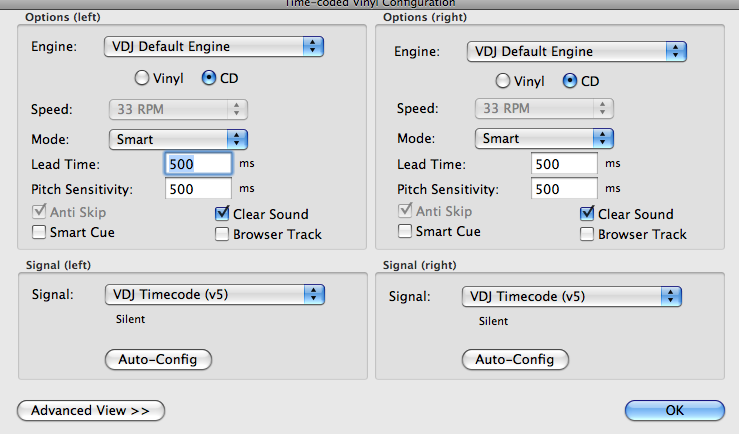
Click Time Code Config
Select CD not Vinyl
Signal: VDJ Timecode (v4)
Insert Time Code CD and start playing. I am assuming that you have all this connected properly at this time. If not check the manual for the hookup.
Click Advance View >>>
Select Invert Stereo on left side only. For some reason if you don't it will play backwards. Weird!
Click on Auto-Config
You should see some sort of signal at this point. You're done!
After struggling for a few days, I finally got the Maya44 USB sound card to work with TCCD. I am posting all the settings for anyone that is running into trouble because it was a pain in the arse for me. I hope this helps. For my setup, I am using the Pioneer CDJ-1000 MK2 cd players but just about any cd player will do. I assume that you have wired up the Maya44 USB sound card and installed the Control Panel at this point. Here are my settings.
Maya Control Panel setup:
Monitor: Mute both In 1+2, In 3+4
Output: Max and unmuted
Input: Approx-85% otherwise the signal will be too strong when you do Auto-Config later on. Also unmuted.
Close
Audio Device setup on Mac:
Open Finder > Applications > Utilties > Audio MIDI Setup.app
Create Aggregate Device
Under "Properties For:" select Aggregate Device
Click "Configure Device"
Check both Maya44 USB
Done
Format: 44100.0 Hz
VDJ setup:
Inputs: Timecodes
Outputs: External Mixer
Sound card(s): 4-In/4-Out Card
Driver 1: Aggregate Device
Click Time Code Config
Select CD not Vinyl
Signal: VDJ Timecode (v4)
Insert Time Code CD and start playing. I am assuming that you have all this connected properly at this time. If not check the manual for the hookup.
Click Advance View >>>
Select Invert Stereo on left side only. For some reason if you don't it will play backwards. Weird!
Click on Auto-Config
You should see some sort of signal at this point. You're done!
Inviato Mon 24 Nov 08 @ 3:51 pm
 cstoll
VJ Productions wrote :
Select Invert Stereo on left side only. For some reason if you don't it will play backwards. Weird!
It's because you have your cables crossed on your left CD player.
But great information! Thank you...
Inviato Mon 24 Nov 08 @ 6:59 pm
 HiTower
VJ Productions... This is great news! Previously only a few interfaces worked with timecode. Have you done extensive testing with this setup? If so, please let us know what type of testing you did. Currently, I have to use a RMX for my setup with a perfectly good DJM-600 sitting in the garage. If this works for 4 or 5 hour gigs with no problems, please keep us posted. If it works, I'm sure some of us will be asking Santa for a Maya sound card.
Inviato Tue 25 Nov 08 @ 1:30 am
VJ Productions
HiTower wrote :
VJ Productions... This is great news! Previously only a few interfaces worked with timecode. Have you done extensive testing with this setup? If so, please let us know what type of testing you did. Currently, I have to use a RMX for my setup with a perfectly good DJM-600 sitting in the garage. If this works for 4 or 5 hour gigs with no problems, please keep us posted. If it works, I'm sure some of us will be asking Santa for a Maya sound card.
I've used the Maya44 USB on a PC with VDJ previously and it worked fine. There were no hiccups on the PC setup but I'm new to Mac so it was a bit more challenging to me. I played around with new setup for about an hour and it works just like it did on a PC. Just remember not to turn on the tempo on the Pioneer. A side note...I forgot to mention to set the sound card latency to auto. Let me know if you need help with a similar setup. Have fun!
Inviato Tue 25 Nov 08 @ 12:14 pm
VJ Productions
HiTower wrote :
VJ Productions... This is great news! Previously only a few interfaces worked with timecode. Have you done extensive testing with this setup? If so, please let us know what type of testing you did. Currently, I have to use a RMX for my setup with a perfectly good DJM-600 sitting in the garage. If this works for 4 or 5 hour gigs with no problems, please keep us posted. If it works, I'm sure some of us will be asking Santa for a Maya sound card.
As for testing, I stress tested the VDJ key lock by setting the Pioneer pitch range to 100%. No hiccups, not even on videos. Make sure your Mac can handle it. I'm using a Macbook Pro 2.6 GHz, 2g ram. Btw, the Maya44 USB is discontinued but I'm sure you can find one used.
Inviato Tue 25 Nov 08 @ 12:20 pm
cstoll
VJ Productions wrote :
Btw, the Maya44 USB is discontinued but I'm sure you can find one used.
No it was re-issued and is readily available again.
Inviato Tue 25 Nov 08 @ 3:52 pm
HiTower
Great feedback VJ! I believe I'll be looking for a Maya soon so I can knock the dust off the 600.
Inviato Wed 26 Nov 08 @ 2:22 am
elseyjames
Works the same on mac for full size turntables, except obviously select "Vinyl" on the "Timecode Config" - Mine works fine with "VDJ Timecode (V5)" for me.
Just thought I would confirm this. As I have this fully working myself.
Just thought I would confirm this. As I have this fully working myself.
Inviato Fri 05 Dec 08 @ 6:01 pm
 spinnaJ
elseyjames wrote :
Works the same on mac for full size turntables, except obviously select "Vinyl" on the "Timecode Config" - Mine works fine with "VDJ Timecode (V5)" for me.
Just thought I would confirm this. As I have this fully working myself.
Just thought I would confirm this. As I have this fully working myself.
Glad it work too for you;)
And pls register ur serial in ur modify ur profile. Thanks.
Regards.
Mac tech support forum moderator.
Inviato Sat 06 Dec 08 @ 4:56 am
ChristofM
I did everything in this post, but still no signal..
I've got this cd-player: Dap Audio 900-D and a macbook pro
Anyone knows what the problem can be?
I've got this cd-player: Dap Audio 900-D and a macbook pro
Anyone knows what the problem can be?
Inviato Sun 07 Dec 08 @ 10:29 am
ChristofM
ChristofM wrote :
I did everything in this post, but still no signal..
I've got this cd-player: Dap Audio 900-D and a macbook pro
Does VDJ support timecode for mac with cd's? Or only vinyl?
Anyone knows what the problem can be?
I've got this cd-player: Dap Audio 900-D and a macbook pro
Does VDJ support timecode for mac with cd's? Or only vinyl?
Anyone knows what the problem can be?
Inviato Tue 09 Dec 08 @ 6:17 am
spinnaJ
Have u create the maya in the audio midi set up as aggregate device?
Inviato Tue 09 Dec 08 @ 6:36 am
ChristofM
I found it! It was the aggregate device ;)
Thanks!
Thanks!
Inviato Tue 09 Dec 08 @ 7:01 am
spinnaJ
Cool glad u found it;) Now enjoy it..hehe
Regards;)
Regards;)
Inviato Tue 09 Dec 08 @ 7:18 am
Dj Mikels
anyone knows if the stanton final scratch open will work with those settings????i have very big problem....
Inviato Wed 10 Dec 08 @ 7:40 pm
spinnaJ
Dj Mikels wrote :
anyone knows if the stanton final scratch open will work with those settings????i have very big problem....
For timecodes purpose i don't think it will at the moment but for normal use it is possible. Just create the aggregate devices for it in audio midi setup:)
Regards;)
Inviato Sun 14 Dec 08 @ 11:21 pm
djtanu
Hi
My signal drops after 1-5 min. And my englis is bad. But i understand what you write :)
My signal drops after 1-5 min. And my englis is bad. But i understand what you write :)
Inviato Sat 27 Dec 08 @ 3:12 pm
even514
i have a hercules rmx console and im just wonderin how to prgram the soundeffect buttons?? can anyone help me?
Inviato Sun 11 Jan 09 @ 12:23 am
atxwreckz
VJ Productions wrote :
Hey everybody,
After struggling for a few days, I finally got the Maya44 USB sound card to work with TCCD. I am posting all the settings for anyone that is running into trouble because it was a pain in the arse for me. I hope this helps. For my setup, I am using the Pioneer CDJ-1000 MK2 cd players but just about any cd player will do. I assume that you have wired up the Maya44 USB sound card and installed the Control Panel at this point. Here are my settings.
Maya Control Panel setup:
Monitor: Mute both In 1+2, In 3+4
Output: Max and unmuted
Input: Approx-85% otherwise the signal will be too strong when you do Auto-Config later on. Also unmuted.
Close
Audio Device setup on Mac:
Open Finder > Applications > Utilties > Audio MIDI Setup.app
Create Aggregate Device
Under "Properties For:" select Aggregate Device
Click "Configure Device"
Check both Maya44 USB
Done
Format: 44100.0 Hz
VDJ setup:
Inputs: Timecodes
Outputs: External Mixer
Sound card(s): 4-In/4-Out Card
Driver 1: Aggregate Device
Click Time Code Config
Select CD not Vinyl
Signal: VDJ Timecode (v4)
Insert Time Code CD and start playing. I am assuming that you have all this connected properly at this time. If not check the manual for the hookup.
Click Advance View >>>
Select Invert Stereo on left side only. For some reason if you don't it will play backwards. Weird!
Click on Auto-Config
You should see some sort of signal at this point. You're done!
After struggling for a few days, I finally got the Maya44 USB sound card to work with TCCD. I am posting all the settings for anyone that is running into trouble because it was a pain in the arse for me. I hope this helps. For my setup, I am using the Pioneer CDJ-1000 MK2 cd players but just about any cd player will do. I assume that you have wired up the Maya44 USB sound card and installed the Control Panel at this point. Here are my settings.
Maya Control Panel setup:
Monitor: Mute both In 1+2, In 3+4
Output: Max and unmuted
Input: Approx-85% otherwise the signal will be too strong when you do Auto-Config later on. Also unmuted.
Close
Audio Device setup on Mac:
Open Finder > Applications > Utilties > Audio MIDI Setup.app
Create Aggregate Device
Under "Properties For:" select Aggregate Device
Click "Configure Device"
Check both Maya44 USB
Done
Format: 44100.0 Hz
VDJ setup:
Inputs: Timecodes
Outputs: External Mixer
Sound card(s): 4-In/4-Out Card
Driver 1: Aggregate Device
Click Time Code Config
Select CD not Vinyl
Signal: VDJ Timecode (v4)
Insert Time Code CD and start playing. I am assuming that you have all this connected properly at this time. If not check the manual for the hookup.
Click Advance View >>>
Select Invert Stereo on left side only. For some reason if you don't it will play backwards. Weird!
Click on Auto-Config
You should see some sort of signal at this point. You're done!
Are you running Leopard?? How did you get the even get the control panel?? Mine won't install off the cd it came with.
Inviato Tue 17 Feb 09 @ 11:04 pm
Alexxiong
I have U46DJ sound card running on Mac OSX 10.5.6 with TCCD. I don\\\'t have aggregate device with going to midi setup. I can\\\'t get VDJ to work with the sound card. The TCCD don\\\'t come thru. Any help?

Inviato Fri 27 Feb 09 @ 11:49 pm
