


 DJ VinylTouch
Yes (althought I'm not sure if this is true if keepBPMonAnalyzerUpdate is set to No).
The alternative would be running an extra analysis when most likely it's not needed, making resource usage higher.
The likely rationale = minimize resource usage (don't run an analysis unless it's obvious you should (i.e. it's a track that was just seen for the first time within VirtualDJ)) + if you already added a track, you'll know if it needs fluid analysis or not - if it does, then run it (add it to a folder of similar BPM range, needing fluid analysis tracks and rerun the analysis on them).
The alternative would be running an extra analysis when most likely it's not needed, making resource usage higher.
The likely rationale = minimize resource usage (don't run an analysis unless it's obvious you should (i.e. it's a track that was just seen for the first time within VirtualDJ)) + if you already added a track, you'll know if it needs fluid analysis or not - if it does, then run it (add it to a folder of similar BPM range, needing fluid analysis tracks and rerun the analysis on them).
Inviato Fri 03 Apr 26 @ 10:00 pm
 IIDEEJAYII
the Option keepBPMonAnalyzerUpdate confuses me a bit.
Since its description:
Implies, setting it to YES, is the way to, NOT, do an auto reanalysis when the BPM analyzer is updated.
And NO, will indeed, auto reanalyze.
Have set it to YES so I can choose, manually if the reanalysis should be done,
(IE stopping from undoing any, custom changes to the fluid grid one may have made)
Hope I have the keepBPMonAnalyzerUpdate set correctly to NOT, auto reanalyze, with updated Fluid analyzers :)
Since its description:
Quote :
When enabled, automatically detected bpm and beat-grid will not be updated when the bpm analyzer has been updated. Only manual re-scan will then update the bpm and phase with the new analyzer.
Implies, setting it to YES, is the way to, NOT, do an auto reanalysis when the BPM analyzer is updated.
And NO, will indeed, auto reanalyze.
Have set it to YES so I can choose, manually if the reanalysis should be done,
(IE stopping from undoing any, custom changes to the fluid grid one may have made)
Hope I have the keepBPMonAnalyzerUpdate set correctly to NOT, auto reanalyze, with updated Fluid analyzers :)
Inviato Fri 03 Apr 26 @ 10:33 pm
DJ VinylTouch
Yep I have it set to Yes for the same reason (I don't want any unexpected grid updates because I played a song after a BPM engine update).
Inviato Fri 03 Apr 26 @ 11:14 pm
Legaldj1
So I found out a few things about the fluid analysis. When the fluidAnalysis setting is set to auto, the track will automatically switch from rigid to fluid in the BPM Editor if the track requires it, but only if the track has not been previously BPM analyzed, such as new tracks being added for the first time. For tracks that have already been previously BPM analyzed, if you have a whole bunch of tracks that need to be fluid, you can select them all, right click, Batch, then select Analyze for BPM etc.
Inviato Sat 04 Apr 26 @ 1:33 am
 DJ Faber Zee
I noticed that for FLUID tracks, the BPM displayed appears to reflect the highest tempo reached within the track. This is both inaccurate and potentially misleading.
For example, if a track ranges from 120 to 126 BPM but VirtualDJ displays 126 BPM, when selecting the next track while playing at 120 BPM, you don’t immediately realize that the track actually starts at 120 and evolves over time.
A more informative approach would be to display the BPM as a range (min–max) for FLUID tracks. Even showing just the minimum BPM would already provide a more accurate and practical reference for mixing decisions.
What do you guys think? is VDJ actually showing the highest BPM on a track or is just my impression?
Looking forward to your thoughts.
For example, if a track ranges from 120 to 126 BPM but VirtualDJ displays 126 BPM, when selecting the next track while playing at 120 BPM, you don’t immediately realize that the track actually starts at 120 and evolves over time.
A more informative approach would be to display the BPM as a range (min–max) for FLUID tracks. Even showing just the minimum BPM would already provide a more accurate and practical reference for mixing decisions.
What do you guys think? is VDJ actually showing the highest BPM on a track or is just my impression?
Looking forward to your thoughts.
Inviato Sat 04 Apr 26 @ 7:12 am
 groovindj
I definitely agree here. IMO for fluid tracks, the BPM shown should be the BPM at that exact point, not an average (as that's what we used to have before fluid).
The subtle variations have been hidden, whereas in earlier builds it was easy to see - the readout was "live".
In the default skin we have the tiny tilde symbol to signify a fluid track - but there are hundreds of old skins that don't have that indication. IMO therefore the best way to show that the BPM is changing is to show it via the BPM readout.
The subtle variations have been hidden, whereas in earlier builds it was easy to see - the readout was "live".
In the default skin we have the tiny tilde symbol to signify a fluid track - but there are hundreds of old skins that don't have that indication. IMO therefore the best way to show that the BPM is changing is to show it via the BPM readout.
Inviato Sat 04 Apr 26 @ 8:26 am
 kradcliffe
Just loaded Earth, Wind & Fire September and analyzed it for fluid.
The intro is around 120bpm and the rest of the song is around 126bpm. I loaded it in the deck and the readout DOES change when the song gets faster.
If I then click for the BPM Stabiliser the whole track stays at that selected BPM. Is that not the expected behaviour?
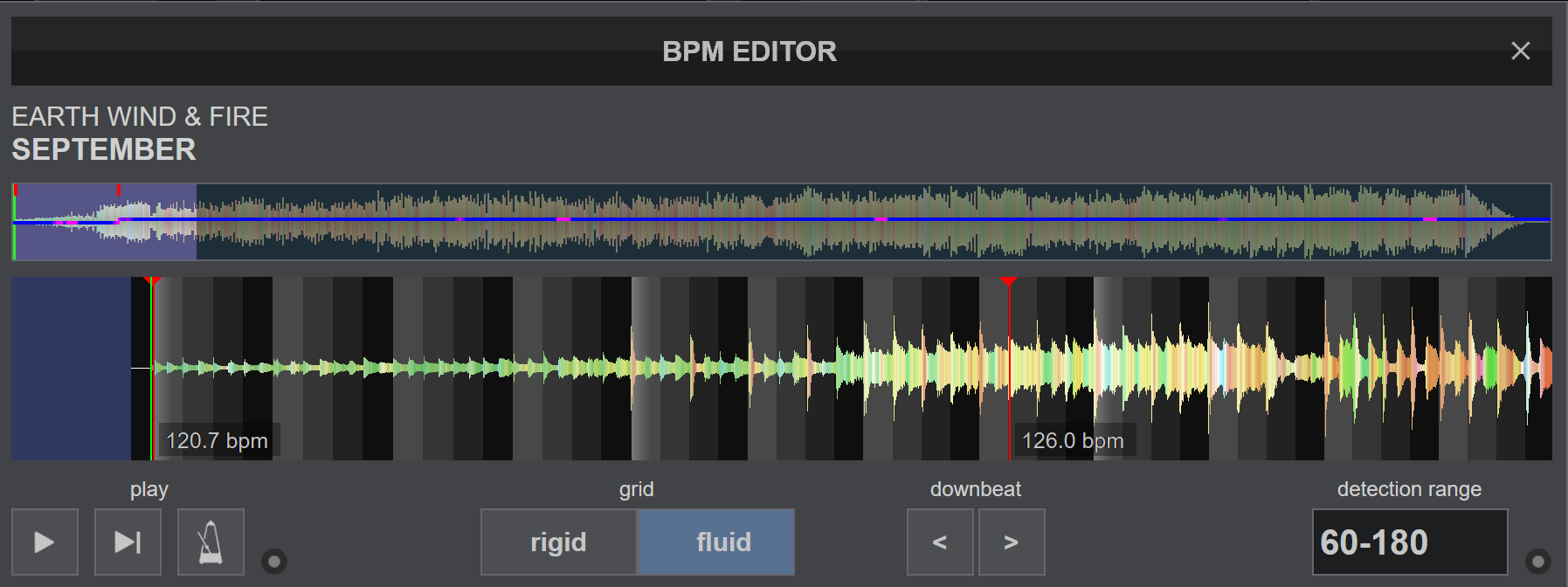
The intro is around 120bpm and the rest of the song is around 126bpm. I loaded it in the deck and the readout DOES change when the song gets faster.
If I then click for the BPM Stabiliser the whole track stays at that selected BPM. Is that not the expected behaviour?
Inviato Sat 04 Apr 26 @ 9:04 am
DJ Faber Zee
I am talking about the bpm which is displayed in the track list library. What us that track bpm in your library?
Inviato Sat 04 Apr 26 @ 9:07 am
kradcliffe
It's 126, which in this case would be correct as that is what the majority of the track actually is.
I'm assuming the BPM in the browser is the same as before and taken from the rigid scan which again should be the case.
Maybe if fluid is selected it should show the "average" BPM across the whole track as that would be the best representation.
I'm assuming the BPM in the browser is the same as before and taken from the rigid scan which again should be the case.
Maybe if fluid is selected it should show the "average" BPM across the whole track as that would be the best representation.
Inviato Sat 04 Apr 26 @ 9:10 am
DJ Faber Zee
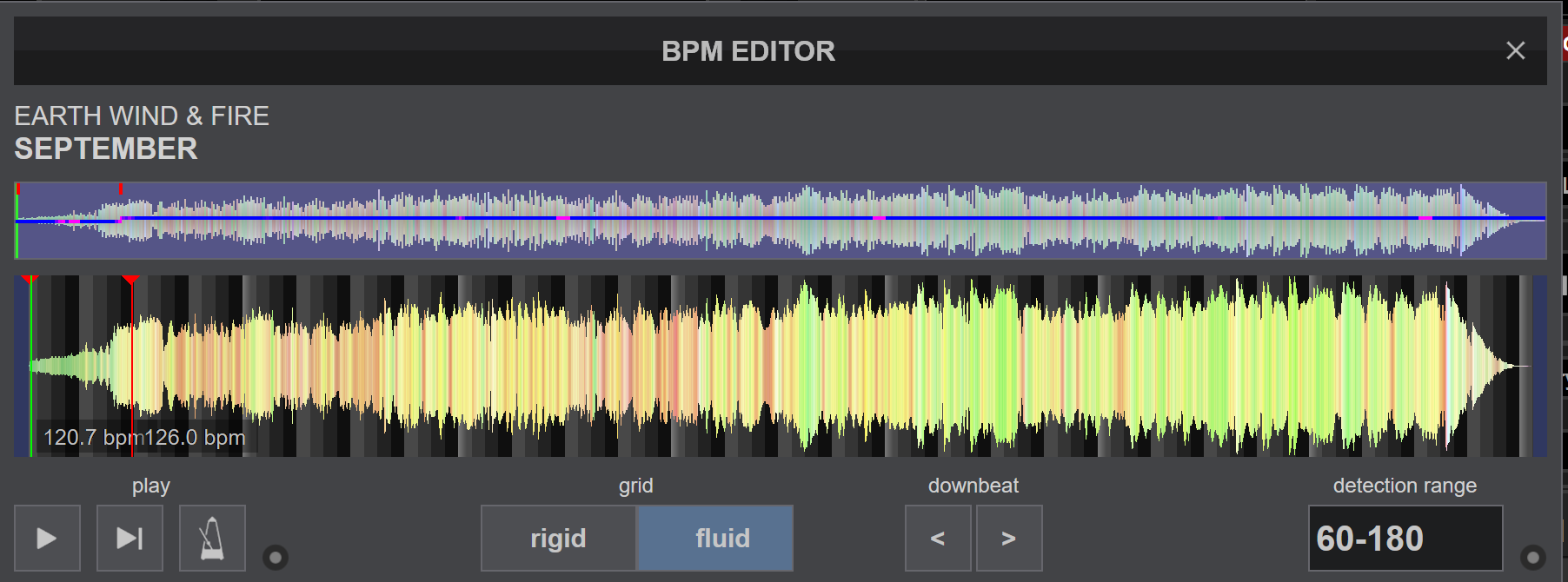
If I’m interpreting the screenshot correctly, the track starts at 120 BPM and then, roughly halfway through, shifts to 126 BPM.
From a mixing standpoint, this distinction is critical. If I’m currently at 120 BPM, I need to know that the track holds at 120 for about a minute, so I can confidently bring it in and complete the mix before the tempo change occurs.
So 126 is wrong in my point of view.
From a mixing standpoint, this distinction is critical. If I’m currently at 120 BPM, I need to know that the track holds at 120 for about a minute, so I can confidently bring it in and complete the mix before the tempo change occurs.
So 126 is wrong in my point of view.
Inviato Sat 04 Apr 26 @ 9:14 am
groovindj
@kradcliffe Yes if there's a red anchor, then you get a little BPM tag at the bottom , and the BPM readout on the default skin will update - BUT in many case now, a track will be fluid analysed and there will be just one anchor at the start, so all you see is one BPM, a straight blue line and no BPM figures throughout the track.
Even when editing, there's no feedback as to what the BPM is anywhere - unless there's an anchor (or you put them in manually).
Potentially yes it's also an issue in the browser, as we only see one BPM (as has always been the case) rather than a "lowest-to-highest" range. In the past I've always noted things using the comments.
For example Barbara Ann by Webster Lewis is 124-125-128-129-128-130-128 but the browser BPM says ~127.7
Even when editing, there's no feedback as to what the BPM is anywhere - unless there's an anchor (or you put them in manually).
Potentially yes it's also an issue in the browser, as we only see one BPM (as has always been the case) rather than a "lowest-to-highest" range. In the past I've always noted things using the comments.
For example Barbara Ann by Webster Lewis is 124-125-128-129-128-130-128 but the browser BPM says ~127.7
Inviato Sat 04 Apr 26 @ 9:16 am
kradcliffe
DJ Faber Zee wrote :
If I’m interpreting the screenshot correctly, the track starts at 120 BPM and then, roughly halfway through, shifts to 126 BPM
No, the 120bpm is maybe only 15 seconds, the rest of the track is 126
Inviato Sat 04 Apr 26 @ 9:19 am
groovindj
Is the rest of the track really a steady 126 all the way through from there though? This is my point.
It's made to look as if the track is not fluid, but just switches between 2 distinct tempos and stays steady.
A MusicRadar article says "By the time the track fades out, the tempo is close to 129bpm"
It's made to look as if the track is not fluid, but just switches between 2 distinct tempos and stays steady.
A MusicRadar article says "By the time the track fades out, the tempo is close to 129bpm"
Inviato Sat 04 Apr 26 @ 9:23 am
DJ Faber Zee
kradcliffe wrote :
No, the 120bpm is maybe only 15 seconds, the rest of the track is 126
DJ Faber Zee wrote :
If I’m interpreting the screenshot correctly, the track starts at 120 BPM and then, roughly halfway through, shifts to 126 BPM
No, the 120bpm is maybe only 15 seconds, the rest of the track is 126
Ok...so that's interesting...hut bpm variations should be immediately visible in track library somehow...
Inviato Sat 04 Apr 26 @ 9:33 am
groovindj
Algoriddim djay Pro has the start at 117.2 but similarly to VDJ has 126.0 for the majority of the track - even though it's 128+ towards the end. 😮
Inviato Sat 04 Apr 26 @ 9:43 am
 UweB
UweB
There are still DJs who can hear the BPM with absolute precision.
For visual DJs, it's also visible in the waveform.
The displayed BPM should always be reasonably up-to-date.
And this even seems to work with older skins. At least, that's my impression so far.
I've tested it with a few tracks, and with very few exceptions, it works perfectly.
For visual DJs, it's also visible in the waveform.
The displayed BPM should always be reasonably up-to-date.
And this even seems to work with older skins. At least, that's my impression so far.
I've tested it with a few tracks, and with very few exceptions, it works perfectly.
Inviato Sat 04 Apr 26 @ 12:04 pm
 TampaBBoy
i love it
Inviato Sat 04 Apr 26 @ 2:34 pm
 The Party Engineer
In order to save some space at browser, it would be nice if the info shown at the Fluid collum, can also shown with symbols (along with the ~) at the BPM collum. For example, a tik (like the one shown at the key collum) could indicate that the track has been analyzed with fluid beat grid.
Inviato Sun 05 Apr 26 @ 12:15 pm
 lakis69
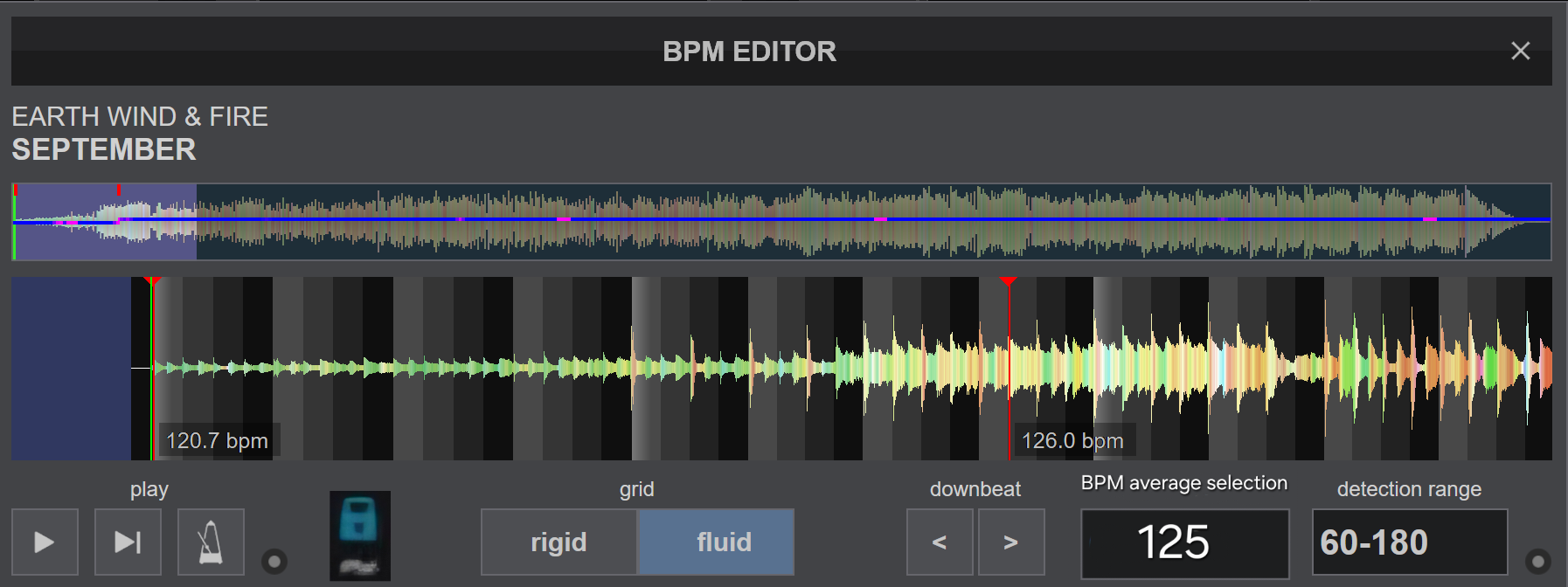
I would suggest an idea... to add an option to the bpm editor where we can choose at what bpm the song should play... for example if a song is 120, then 125, then 121 then 120... to choose at which bpm to lock, for example at 125 permanently and not let the program choose on its own... rekordbox has something similar where you choose on the decks at how many bpm you want all the songs you add to play... to put something similar in vdj but for the bpm editor.
example...
example...
Inviato Sun 05 Apr 26 @ 9:31 pm
 Matty1000
wierd one happened last night, where i used part 2 for the first time. and "stabilize" was on as default.
i played a transition track, which goes from 100-120 (intentionally)
however "pitch lock" was still activated , from mixing it with the previous song.
pitch lock, then prevents the song from going to 120 bpm and tries to keep it at 100 which obviously sounds totally wierd.
it caused a moment of panic, while i went to the menu to turn off stabilize which seemd to fix it.
i can see that catching people out.
i played a transition track, which goes from 100-120 (intentionally)
however "pitch lock" was still activated , from mixing it with the previous song.
pitch lock, then prevents the song from going to 120 bpm and tries to keep it at 100 which obviously sounds totally wierd.
it caused a moment of panic, while i went to the menu to turn off stabilize which seemd to fix it.
i can see that catching people out.
Inviato Sun 05 Apr 26 @ 10:38 pm
