


 JoeyKJ
How can I fix this problem, some video's display full screen and some does not, included sample image.
Thanks, Joey

Thanks, Joey
Inviato Mon 23 Feb 26 @ 6:42 pm
 locoDog
setting letterBoxing
but it's a bit of a muddled fix [and always will be], some vids will look ok zoomed, others ok when cropped, bars the image will always look right you could fill the edges with blur plugin.
but it's a bit of a muddled fix [and always will be], some vids will look ok zoomed, others ok when cropped, bars the image will always look right you could fill the edges with blur plugin.
Inviato Mon 23 Feb 26 @ 7:26 pm
 groovindj
The question is whether it's encoded as an actual 4:3 video or it's 16:9 with the 4:3 window inside it.
If it's the latter, the black bars are part of the video.
If it's the latter, the black bars are part of the video.
Inviato Mon 23 Feb 26 @ 7:46 pm
 kradcliffe
If the black bars are permanently there on a 4:3 video you can use Handbrake to easily remove them.
Inviato Mon 23 Feb 26 @ 8:00 pm
JoeyKJ
Thank you guys for the reply's, will try and post results.
Thank you,
Joey
Thank you,
Joey
Inviato Sun 01 Mar 26 @ 11:10 pm
JoeyKJ
Hi, I just Tried the same clip on VDJ 7.4 and it is full screen display perfect.
How do I get this clips to display full screen on the new VDJ or what settings do I have to adjust to what?
Thanks, Joey.
How do I get this clips to display full screen on the new VDJ or what settings do I have to adjust to what?
Thanks, Joey.
Inviato Mon 02 Mar 26 @ 10:03 pm
JoeyKJ
I have new information on the videos that doesn't render full screen on external monitors,
The videos are 720x480 pixels MPEG Video.
My VDJ display settings are attached in image, if some of these can be changed to enable full screen display I would appreciate some help with this..
Thank you,
Joey..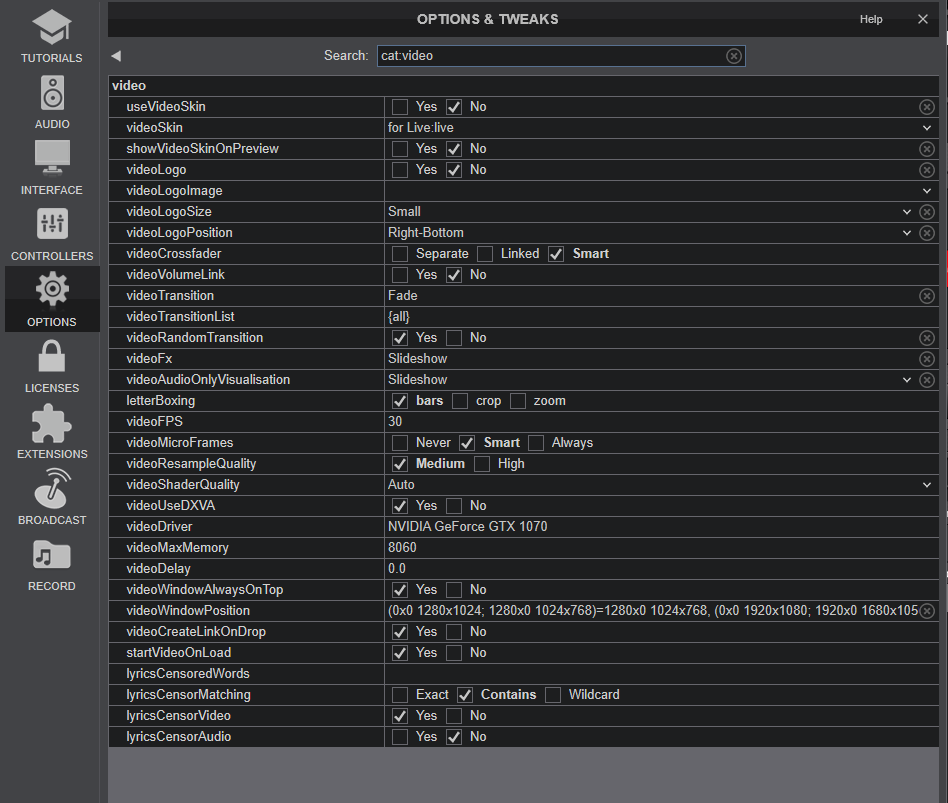
The videos are 720x480 pixels MPEG Video.
My VDJ display settings are attached in image, if some of these can be changed to enable full screen display I would appreciate some help with this..
Thank you,
Joey..
Inviato Sat 14 Mar 26 @ 7:06 pm
JoeyKJ
groovindj wrote :
The question is whether it's encoded as an actual 4:3 video or it's 16:9 with the 4:3 window inside it.
If it's the latter, the black bars are part of the video.
If it's the latter, the black bars are part of the video.
Black bar is not part of the video, it played full screen with an older version of VJD with no issues.
Inviato Sat 14 Mar 26 @ 7:09 pm
groovindj
As locodog suggested, you could use the blur option. You could also zoom it (but lose part of the top/bottom).
Inviato Sat 14 Mar 26 @ 7:28 pm
locoDog
I can't see how it displays full screen on old versions without being stretched.
Inviato Sat 14 Mar 26 @ 7:51 pm
JoeyKJ
After looking at the options in the video display as per above screen shot I found a setting for Video Window Position, it has a lot of video parameters already entered like these below,
(0x0 1280x1024; 1280x0 1024x768)=1280x0 1024x768, (0x0 1920x1080; 1920x0 1680x1050)=1920x0 1680x1050, (0x0 1920x1080)=1252x101 640x360, (0x0 1920x1080; 1920x0 3840x2160)=1920x0 3840x2160, (0x0 1920x1080; 1920x0 1680x1050; 3600x0 3840x2160)=1920x0 1680x1050, (0x0 1920x1080; 1920x0 1920x1080)=1920x0 1920x1080
Can I just enter the the video format I am missing in a particular way so it can work for 720x480 pixels at full display?
Thank you..
(0x0 1280x1024; 1280x0 1024x768)=1280x0 1024x768, (0x0 1920x1080; 1920x0 1680x1050)=1920x0 1680x1050, (0x0 1920x1080)=1252x101 640x360, (0x0 1920x1080; 1920x0 3840x2160)=1920x0 3840x2160, (0x0 1920x1080; 1920x0 1680x1050; 3600x0 3840x2160)=1920x0 1680x1050, (0x0 1920x1080; 1920x0 1920x1080)=1920x0 1920x1080
Can I just enter the the video format I am missing in a particular way so it can work for 720x480 pixels at full display?
Thank you..
Inviato Sat 14 Mar 26 @ 9:25 pm
JoeyKJ
This is playing on the older version of VDJ full screen from left to right like in this example below,
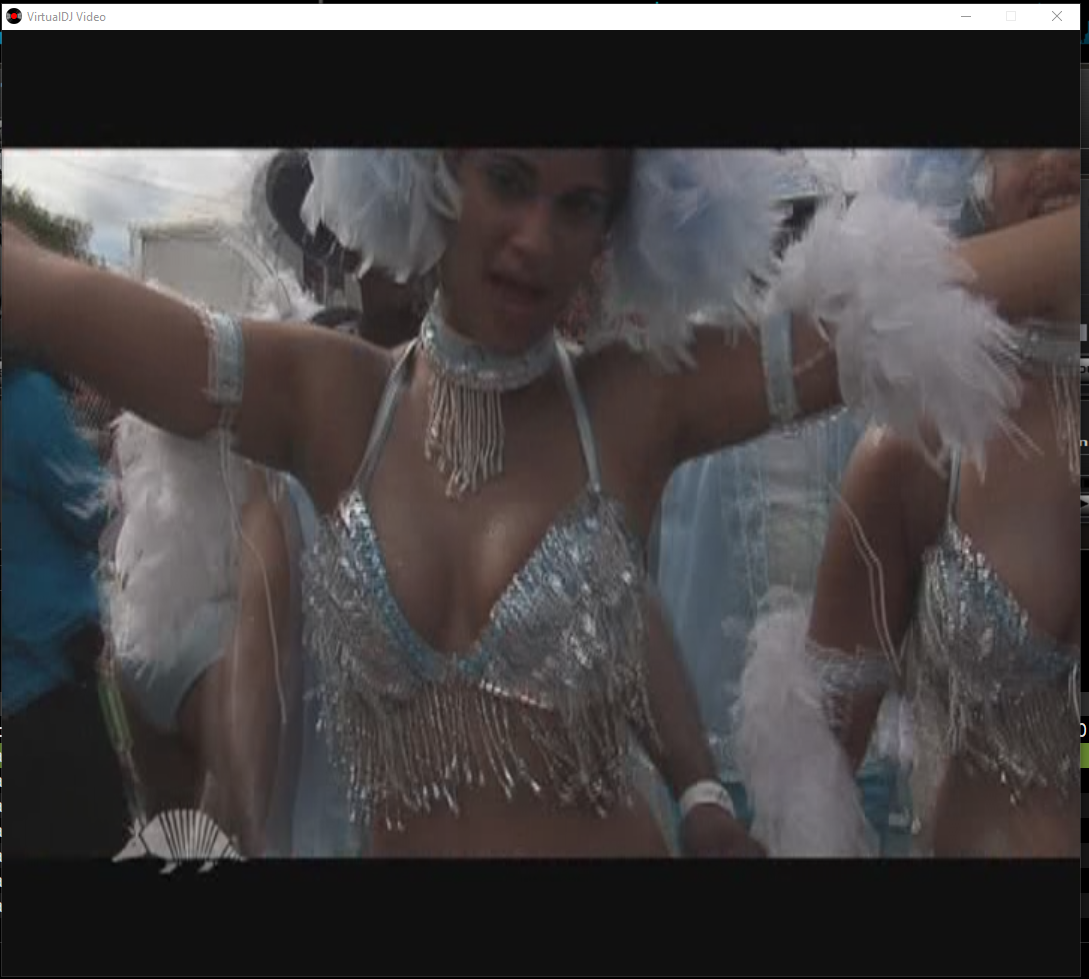 I could stretch it on left or right and it doesn't create black ribbon like in current version.
Now on Image #2 is being play with the current version of VDJ.
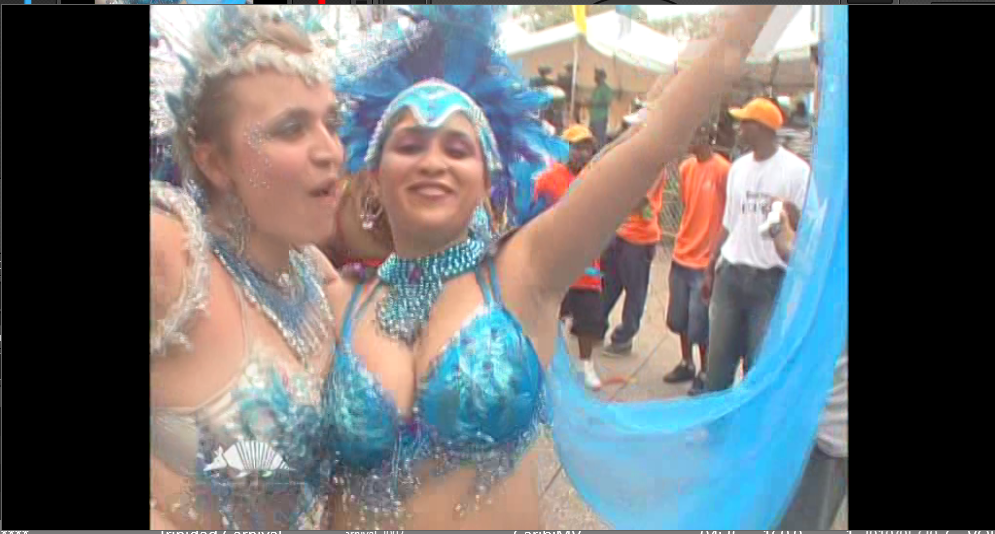
I could stretch it on left or right and it doesn't create black ribbon like in current version.Now on Image #2 is being play with the current version of VDJ.
Inviato Sat 14 Mar 26 @ 9:50 pm