


 DJNeilSFLA
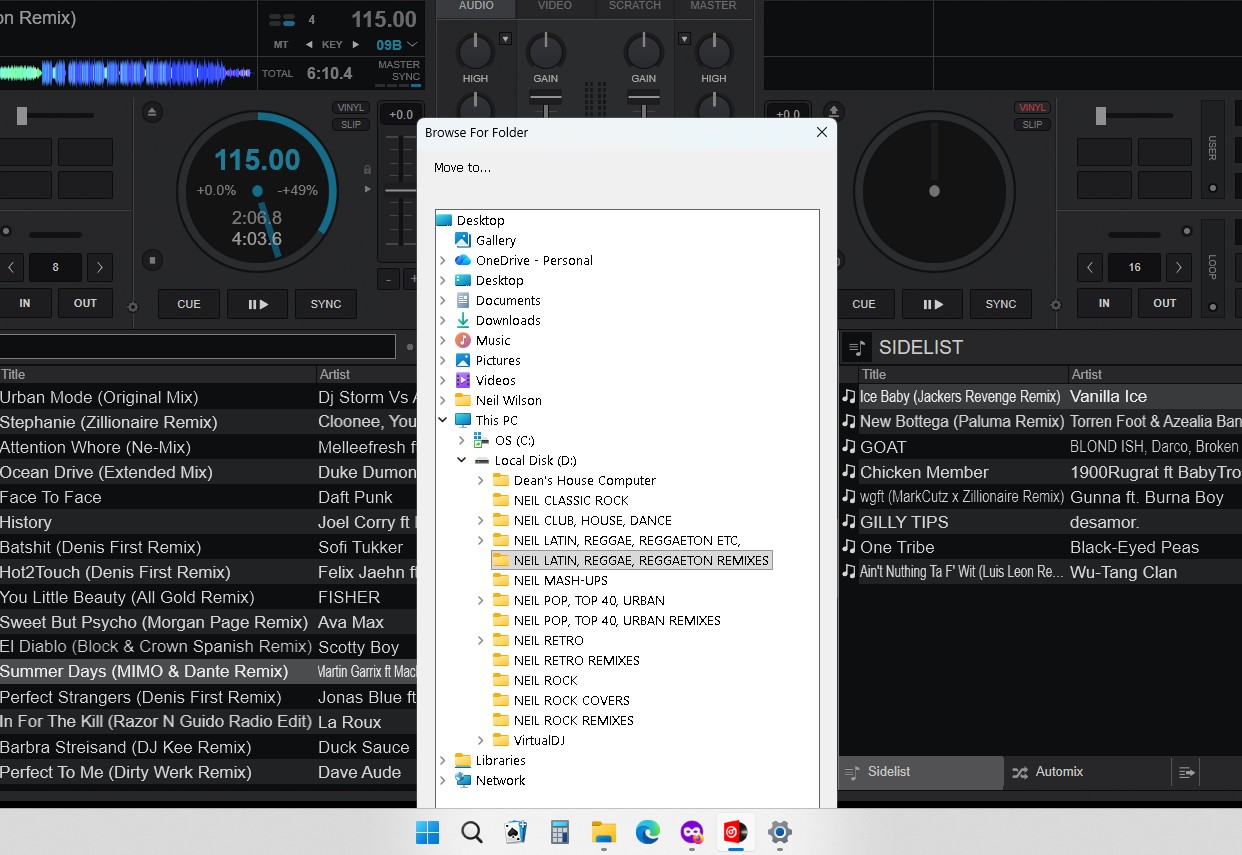
Hey guys. I'm having less a problem than an annoyance. I checked the manual and Googled it but I can't find a fix that works. When I go to move tracks from one folder to another I get the dialogue box to do so, But the buttons on the bottom (Make New Folder,OK and Cancel are always obscured so I have to manually move the box. Not a MAJOR deal typically, but I'm completely reconfiguring a HUGE amount of files and it's getting annoying. I know someone is going to say do it from Windows Explorer, VDJ has them configured how I like it so its easier for me in VDJ. Picture included for context Any suggestions? Thank you in advance for any help.
BTW: I DID Google it and try to find it in the manual as well as posting on social media sites already. So now to the experts
BTW: I DID Google it and try to find it in the manual as well as posting on social media sites already. So now to the experts
Inviato 13 hours ago
 PhantomDeejay
1) I don't know why your "Folder Select" dialog has this size, but that's not normal. Nor VirtualDJ stores and recalls the size of that window.
2) You can use SHIFT+DRAG to move a file between different folders directly from VirtualDJ browser.
3) You can use CTRL+DRAG to copy a file to a different folder, directly from VirtualDJ browser.
2) You can use SHIFT+DRAG to move a file between different folders directly from VirtualDJ browser.
3) You can use CTRL+DRAG to copy a file to a different folder, directly from VirtualDJ browser.
Inviato 7 hours ago