


 Nate

When I use VDJ by itself the Headphone mix works, when I plug in the FLX4 the headphone mix does not work at all
Inviato Tue 13 Oct 26 @ 1:32 am
Nate
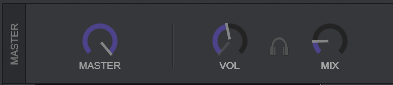
this is what I am talking about, and no matter what I do, it will not work with FLX4
Inviato Tue 13 Oct 26 @ 1:35 am
 PhantomDeejay

Read the following page carefully:
https://virtualdj.com/manuals/hardware/pioneer/ddjflx4/controls.html
You need to also press button 28 to send the master channel audio on your headphones alongside the HP MIX knob.
https://virtualdj.com/manuals/hardware/pioneer/ddjflx4/controls.html
You need to also press button 28 to send the master channel audio on your headphones alongside the HP MIX knob.
Inviato Tue 13 Oct 26 @ 10:50 am
Nate
PhantomDeejay wrote :
Read the following page carefully:
https://virtualdj.com/manuals/hardware/pioneer/ddjflx4/controls.html
You need to also press button 28 to send the master channel audio on your headphones alongside the HP MIX knob.
https://virtualdj.com/manuals/hardware/pioneer/ddjflx4/controls.html
You need to also press button 28 to send the master channel audio on your headphones alongside the HP MIX knob.
Still does not work, I have the master cue on, and nothing, only iof I have the channel cue on do I hear it, but the headphone mix still does nothing if FLX4 is connected. only if I use VDJ as a standalone.
The headphone mix on the FLX4 does affect the knobs on VDJ, but it does nothing
Inviato Tue 13 Oct 26 @ 10:07 pm
PhantomDeejay
Where are your headphones connected at ?
They must be connected on the controller, not on your laptop.
Then you can turn on BOTH master and deck PFL (CUE) and use the knob ON THE CONTROLLER to fade from one to another.
They must be connected on the controller, not on your laptop.
Then you can turn on BOTH master and deck PFL (CUE) and use the knob ON THE CONTROLLER to fade from one to another.
Inviato Tue 13 Oct 26 @ 11:10 pm
Nate
PhantomDeejay wrote :
Where are your headphones connected at ?
They must be connected on the controller, not on your laptop.
Then you can turn on BOTH master and deck PFL (CUE) and use the knob ON THE CONTROLLER to fade from one to another.
They must be connected on the controller, not on your laptop.
Then you can turn on BOTH master and deck PFL (CUE) and use the knob ON THE CONTROLLER to fade from one to another.
thanks Phantom, I was hoping I could use my Logi G733 as the headphones, and while working with just VDJ, it would not work for the headphone mix, this is my current configuration, and it's working with the headphones connected at the FLX4
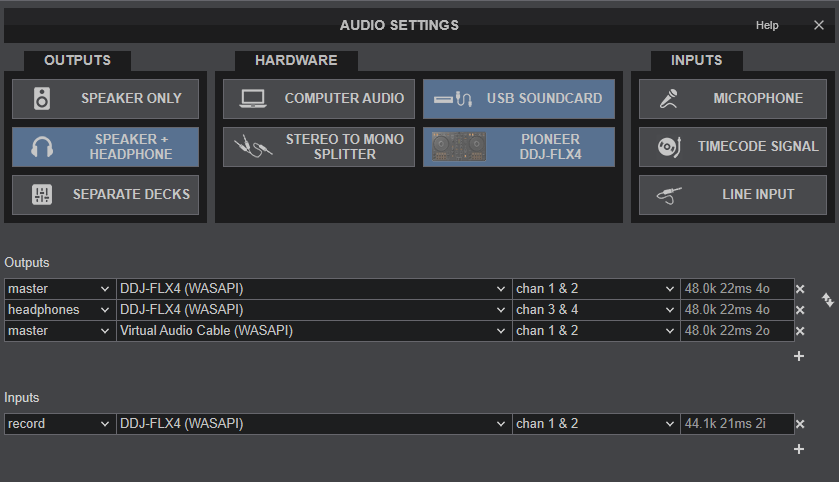
This is what I was trying before
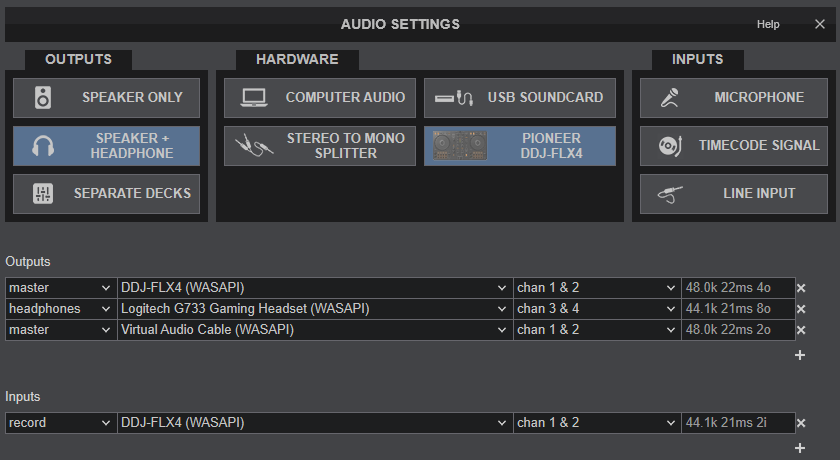
Thanks for your help
Inviato Wed 14 Oct 26 @ 2:41 am