


 DJDeniV

Discussion about DJDeniV Skin
Inviato Thu 29 Oct 26 @ 5:36 pm
 Shabba Khe


Checking out the skin as i see it's new. This is how it looks on my laptop tho.
Using an M1 macbook pro on Sequoia
Inviato Fri 30 Oct 26 @ 11:52 pm
DJDeniV
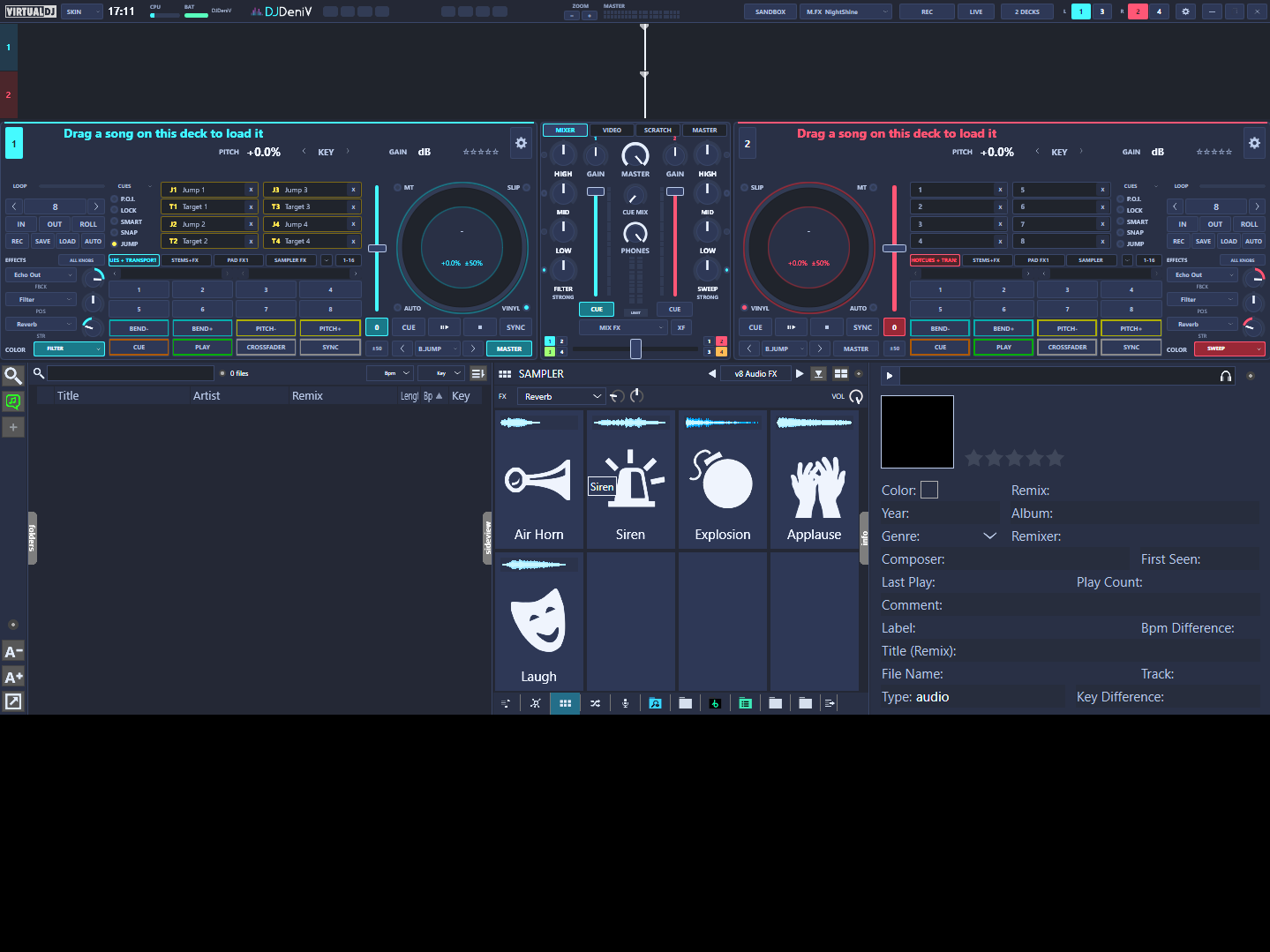
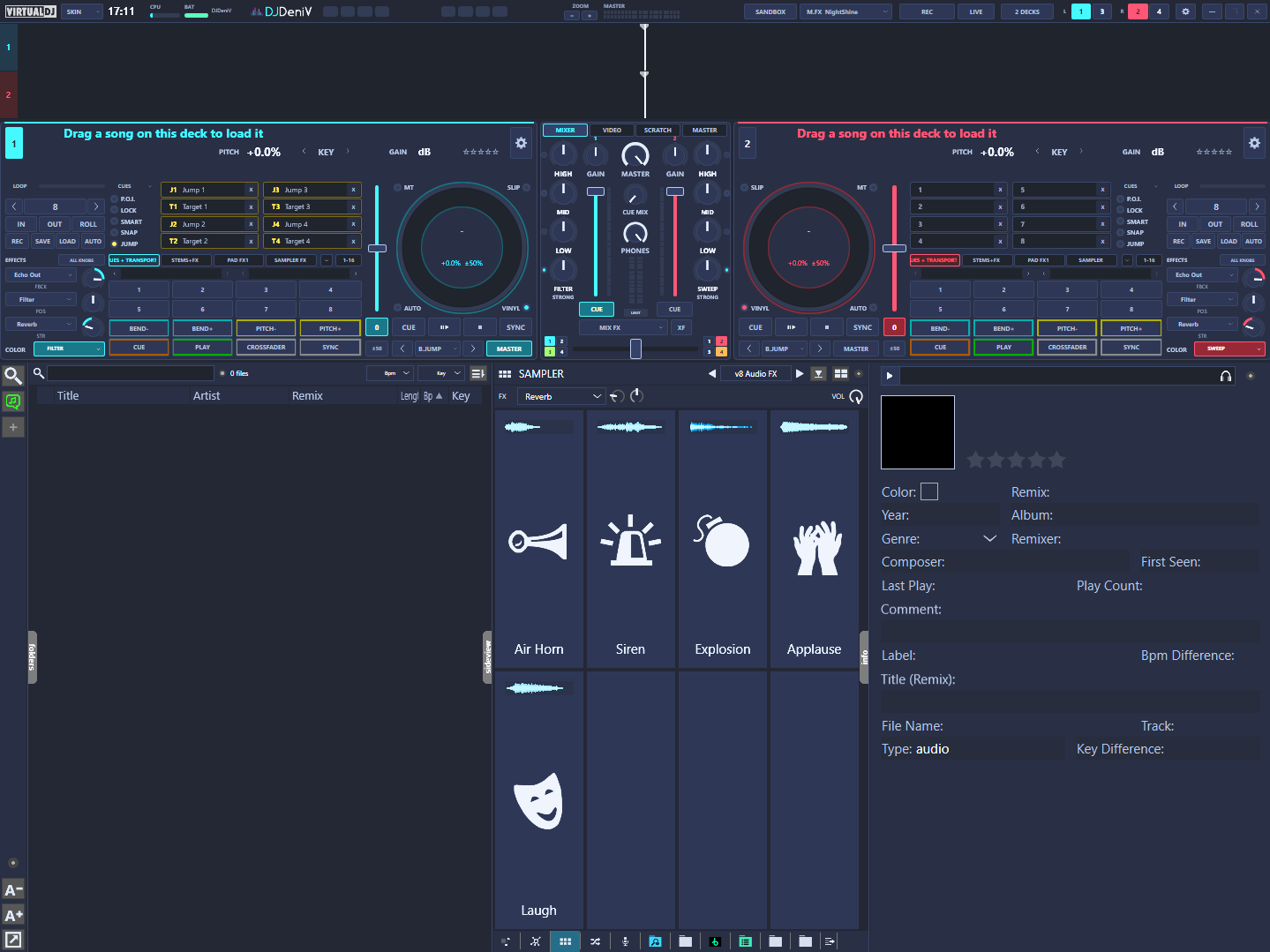
Thanks for the screenshot! MacBook screens are 16:10, and the skin doesn’t yet tell VirtualDJ where to stretch on taller screens, which leaves that empty band. I won’t release an update just for this, because a new version can take months to get approved. But you can fix it by yourself in 2 minutes:
In Finder, open Documents/VirtualDJ/Skins. Double-click DJDeniV Skin.zip to unzip it into a DJDeniV Skin folder, then move the .zip out of the Skins folder, so VirtualDJ doesn’t show the skin twice.
Open DJDeniV Skin/skin.xml with TextEdit. Near the top, find the line that starts with <skin name="DJDeniV Skin" version="8" width="1920" height="1080". Just before the > at the end of that line, add: breakline="1050" breakline2="1060" (with a space in front). The end of the line should then read ... comment="Version 1.0 - 2026-09-28" breakline="1050" breakline2="1060">. Save (keep it as plain text), start VirtualDJ and pick my skin again.
The browser then takes the extra height instead of leaving the empty band. If the skin doesn’t load after the edit, TextEdit probably saved it as rich text: use Format -> Make Plain Text and save again, or just put the original .zip back. The fix will be included whenever I next update the skin.
In Finder, open Documents/VirtualDJ/Skins. Double-click DJDeniV Skin.zip to unzip it into a DJDeniV Skin folder, then move the .zip out of the Skins folder, so VirtualDJ doesn’t show the skin twice.
Open DJDeniV Skin/skin.xml with TextEdit. Near the top, find the line that starts with <skin name="DJDeniV Skin" version="8" width="1920" height="1080". Just before the > at the end of that line, add: breakline="1050" breakline2="1060" (with a space in front). The end of the line should then read ... comment="Version 1.0 - 2026-09-28" breakline="1050" breakline2="1060">. Save (keep it as plain text), start VirtualDJ and pick my skin again.
The browser then takes the extra height instead of leaving the empty band. If the skin doesn’t load after the edit, TextEdit probably saved it as rich text: use Format -> Make Plain Text and save again, or just put the original .zip back. The fix will be included whenever I next update the skin.
Inviato Sat 31 Oct 26 @ 2:40 pm
 djdad

Why did you have to use breaklines ? Doesnt your skin offer Browser always at the bottom ofthe skin ?
Without breaklines at all, the skin should resize properly in all aspect ratios
Or am i missing something ?
Without breaklines at all, the skin should resize properly in all aspect ratios
Or am i missing something ?
Inviato Sat 31 Oct 26 @ 2:55 pm
DJDeniV
Good question, and I’m not 100% sure myself. The browser in my skin isn’t one element at the bottom: it’s a define class placed inside a separate panel for each view (2 decks, 4 decks, big browser), at different heights, and there’s one more browser inside a floating window near the top of the skin. My guess is that the automatic breaklines picked up the wrong browser, because the empty band in his screenshot is exactly the 120 px a 16:10 screen adds. Setting breakline="1050" breakline2="1060" (a strip inside the browser in every view) seemed like the safest way to make it stretch the browser. If there’s a better way to structure this, I’d love to hear it.
Inviato Sat 31 Oct 26 @ 3:01 pm
DJDeniV
I tested it on Windows by running VirtualDJ in a 16:10 window. With version 1.0 (no breaklines) the same empty band appears under the browser. With breakline="1050" breakline2="1060" the browser takes the extra height and the band is gone. So in my skin the automatic breaklines don’t land on the browser, probably because it’s a define class placed inside a different panel for each view, plus one more browser in a floating window near the top. The explicit breaklines fix it.
Inviato Sat 31 Oct 26 @ 3:14 pm
Shabba Khe
DJDeniV wrote :
Thanks for the screenshot! MacBook screens are 16:10, and the skin doesn’t yet tell VirtualDJ where to stretch on taller screens, which leaves that empty band. I won’t release an update just for this, because a new version can take months to get approved. But you can fix it by yourself in 2 minutes:
In Finder, open Documents/VirtualDJ/Skins. Double-click DJDeniV Skin.zip to unzip it into a DJDeniV Skin folder, then move the .zip out of the Skins folder, so VirtualDJ doesn’t show the skin twice.
Open DJDeniV Skin/skin.xml with TextEdit. Near the top, find the line that starts with <skin name="DJDeniV Skin" version="8" width="1920" height="1080". Just before the > at the end of that line, add: breakline="1050" breakline2="1060" (with a space in front). The end of the line should then read ... comment="Version 1.0 - 2026-09-28" breakline="1050" breakline2="1060">. Save (keep it as plain text), start VirtualDJ and pick my skin again.
The browser then takes the extra height instead of leaving the empty band. If the skin doesn’t load after the edit, TextEdit probably saved it as rich text: use Format -> Make Plain Text and save again, or just put the original .zip back. The fix will be included whenever I next update the skin.
In Finder, open Documents/VirtualDJ/Skins. Double-click DJDeniV Skin.zip to unzip it into a DJDeniV Skin folder, then move the .zip out of the Skins folder, so VirtualDJ doesn’t show the skin twice.
Open DJDeniV Skin/skin.xml with TextEdit. Near the top, find the line that starts with <skin name="DJDeniV Skin" version="8" width="1920" height="1080". Just before the > at the end of that line, add: breakline="1050" breakline2="1060" (with a space in front). The end of the line should then read ... comment="Version 1.0 - 2026-09-28" breakline="1050" breakline2="1060">. Save (keep it as plain text), start VirtualDJ and pick my skin again.
The browser then takes the extra height instead of leaving the empty band. If the skin doesn’t load after the edit, TextEdit probably saved it as rich text: use Format -> Make Plain Text and save again, or just put the original .zip back. The fix will be included whenever I next update the skin.
Hi, I've tried what your suggested a few times but none were successful in fixing the issue. I will look out for the update. The pic shows what i've been getting in me trying edit the xml file.
On a sidenote, i was still testing it out and there were a lot that i like about it and then there are a few things i would like to see (and see - as in toggling on and off). This isn't a complaint in anyway. It's a good looking skin.

Inviato Sat 31 Oct 26 @ 5:14 pm
 locoDog

DJDeniV wrote :
With breakline="1050" breakline2="1060" the browser takes the extra height and the band is gone. So in my skin the automatic breaklines don’t land on the browser, probably because it’s a define class placed inside a different panel for each view
no, breakline2 only applies when the 'flexible' part doesn't hit the bottom of the screen.
Just use breakline= marking the top of the browser
If you have conditional sized browser that has various y coords than use conditions on breakline= and have several
Inviato Sat 31 Oct 26 @ 7:27 pm
DJDeniV
Thanks LOCODOG, that makes sense: breakline has to mark the top of the browser, and my browser starts at a different y for each waveform height. So it needs one conditional breakline per height.
Here's a fixed copy you can use right away: https://limewire.com/d/bsPwr#zdR7SAmL1N Delete the old DJDeniV Skin.zip (and the unzipped folder, if you made one) from Documents > VirtualDJ > Skins. Put this zip there, don't unzip it, then pick DJDeniV Skin again in Settings > Interface. If you have ideas for new things in the skin, or things you'd like to toggle on and off, post them here. I'm collecting suggestions for the next update.
Here's a fixed copy you can use right away: https://limewire.com/d/bsPwr#zdR7SAmL1N Delete the old DJDeniV Skin.zip (and the unzipped folder, if you made one) from Documents > VirtualDJ > Skins. Put this zip there, don't unzip it, then pick DJDeniV Skin again in Settings > Interface. If you have ideas for new things in the skin, or things you'd like to toggle on and off, post them here. I'm collecting suggestions for the next update.
Inviato Sun 01 Nov 26 @ 6:56 am
Shabba Khe
DJDeniV wrote :
Thanks LOCODOG, that makes sense: breakline has to mark the top of the browser, and my browser starts at a different y for each waveform height. So it needs one conditional breakline per height.
Here's a fixed copy you can use right away: https://limewire.com/d/bsPwr#zdR7SAmL1N Delete the old DJDeniV Skin.zip (and the unzipped folder, if you made one) from Documents > VirtualDJ > Skins. Put this zip there, don't unzip it, then pick DJDeniV Skin again in Settings > Interface. If you have ideas for new things in the skin, or things you'd like to toggle on and off, post them here. I'm collecting suggestions for the next update.
Here's a fixed copy you can use right away: https://limewire.com/d/bsPwr#zdR7SAmL1N Delete the old DJDeniV Skin.zip (and the unzipped folder, if you made one) from Documents > VirtualDJ > Skins. Put this zip there, don't unzip it, then pick DJDeniV Skin again in Settings > Interface. If you have ideas for new things in the skin, or things you'd like to toggle on and off, post them here. I'm collecting suggestions for the next update.
Thanks, looks great. Will test it out live today
Inviato Sun 01 Nov 26 @ 9:15 am
DJDeniV
Shabba Khe wrote :
Thanks, looks great. Will test it out live today
DJDeniV wrote :
Thanks LOCODOG, that makes sense: breakline has to mark the top of the browser, and my browser starts at a different y for each waveform height. So it needs one conditional breakline per height.
Here's a fixed copy you can use right away: https://limewire.com/d/bsPwr#zdR7SAmL1N Delete the old DJDeniV Skin.zip (and the unzipped folder, if you made one) from Documents > VirtualDJ > Skins. Put this zip there, don't unzip it, then pick DJDeniV Skin again in Settings > Interface. If you have ideas for new things in the skin, or things you'd like to toggle on and off, post them here. I'm collecting suggestions for the next update.
Here's a fixed copy you can use right away: https://limewire.com/d/bsPwr#zdR7SAmL1N Delete the old DJDeniV Skin.zip (and the unzipped folder, if you made one) from Documents > VirtualDJ > Skins. Put this zip there, don't unzip it, then pick DJDeniV Skin again in Settings > Interface. If you have ideas for new things in the skin, or things you'd like to toggle on and off, post them here. I'm collecting suggestions for the next update.
Thanks, looks great. Will test it out live today
Thanks for checking it out on your Mac! Let me know if you have any feature ideas or things you'd like to toggle on and off for the next update!
Inviato Sun 01 Nov 26 @ 9:27 am
 Patch_ed

Hey, the link no longer works, do you think you could post it again, please
edit: actually I'm just being lazy, I will edit the file lol
quote=DJDeniV]Thanks LOCODOG, that makes sense: breakline has to mark the top of the browser, and my browser starts at a different y for each waveform height. So it needs one conditional breakline per height.
Here's a fixed copy you can use right away: https://limewire.com/d/bsPwr#zdR7SAmL1N Delete the old DJDeniV Skin.zip (and the unzipped folder, if you made one) from Documents > VirtualDJ > Skins. Put this zip there, don't unzip it, then pick DJDeniV Skin again in Settings > Interface. If you have ideas for new things in the skin, or things you'd like to toggle on and off, post them here. I'm collecting suggestions for the next update.[/quote]
edit: actually I'm just being lazy, I will edit the file lol
quote=DJDeniV]Thanks LOCODOG, that makes sense: breakline has to mark the top of the browser, and my browser starts at a different y for each waveform height. So it needs one conditional breakline per height.
Here's a fixed copy you can use right away: https://limewire.com/d/bsPwr#zdR7SAmL1N Delete the old DJDeniV Skin.zip (and the unzipped folder, if you made one) from Documents > VirtualDJ > Skins. Put this zip there, don't unzip it, then pick DJDeniV Skin again in Settings > Interface. If you have ideas for new things in the skin, or things you'd like to toggle on and off, post them here. I'm collecting suggestions for the next update.[/quote]
Inviato Sat 07 Nov 26 @ 5:53 am
DJDeniV
Patch_ed wrote :
Hey, the link no longer works, do you think you could post it again, please
edit: actually I'm just being lazy, I will edit the file lol
quote=DJDeniV]Thanks LOCODOG, that makes sense: breakline has to mark the top of the browser, and my browser starts at a different y for each waveform height. So it needs one conditional breakline per height.
Here's a fixed copy you can use right away: https://limewire.com/d/bsPwr#zdR7SAmL1N Delete the old DJDeniV Skin.zip (and the unzipped folder, if you made one) from Documents > VirtualDJ > Skins. Put this zip there, don't unzip it, then pick DJDeniV Skin again in Settings > Interface. If you have ideas for new things in the skin, or things you'd like to toggle on and off, post them here. I'm collecting suggestions for the next update.
edit: actually I'm just being lazy, I will edit the file lol
quote=DJDeniV]Thanks LOCODOG, that makes sense: breakline has to mark the top of the browser, and my browser starts at a different y for each waveform height. So it needs one conditional breakline per height.
Here's a fixed copy you can use right away: https://limewire.com/d/bsPwr#zdR7SAmL1N Delete the old DJDeniV Skin.zip (and the unzipped folder, if you made one) from Documents > VirtualDJ > Skins. Put this zip there, don't unzip it, then pick DJDeniV Skin again in Settings > Interface. If you have ideas for new things in the skin, or things you'd like to toggle on and off, post them here. I'm collecting suggestions for the next update.
[/quote]
Here is the new link: ***** Link Removed *****
(expires in 3 days)
Moderation : Please avoid posting download links in public. If you wish a user to test something, prefer to send him the link as a Private Message.
Inviato Sat 07 Nov 26 @ 6:25 am