


 DJive Plugins

Discussion about DJive Video Wall
Inviato Fri 30 Oct 26 @ 2:22 am
DJive Plugins
If the room can already see your VirtualDJ picture, this sits on that same picture. People scan a code with their phone and join in. You stay in the booth and decide what actually goes up. No extra screen, and your Wi-Fi details are never written on the TV.
Your other video effects stay underneath, so lyrics still show. The video keeps playing while a shoutout or a photo is up. You can drag the code, the chat, and the big card around, and pull the edges if you want them bigger or smaller.
📱 What people do on their phone
They join the venue Wi-Fi and scan. If that Wi-Fi stops phones reaching your laptop, switch to Online and they come in through a link instead. VirtualDJ stays open while that switches over.
You can print the code with your own heading on it. If someone is messing with the link, hit New code. The old one dies, a new one goes on the TV, and the night carries on.
There is a switch at the bottom of the booth. Green means the wall is on the TV. Press it and it goes red, and the code, chat, highlight, vote, game, and backgrounds all leave the picture. Press it again and they come back.
From the phone they can:
Turn any of those off and it simply disappears from the phone.
The bar manager can sign in at the bottom of the phone with a 5-digit PIN from your booth. They set the venue name and logo, and a venue notice goes straight up. You get a fresh PIN every time you open VirtualDJ. Their name and logo stay.
📺 What the room sees
Something you approve pops up big, hangs there for as long as you like (a few seconds, up to a minute), then slides into the chat at the side. You can make that a fade if the fly-in is too much. If the big card is already busy, the next one waits. Your own posts, and anything from the venue, skip the queue.
Shoutouts, photos, and tips have a thin bar along the bottom that runs from green to red as the time runs out. Photos keep their shape. They do not get stretched.
The side chat is the night so far. Shoutouts, requests, photos, tips, poll results, winners, and venue notices. Tips show in gold, with coins and hearts. A venue notice gets a glow and some flames. A long word shrinks until it fits, and it stays a whole word.
Eight reactions in the first minute sets that card on fire. You can change how many it takes, and how long the fire lasts.
You can make all the writing bigger or smaller. The middle of that slider is how it looked before. The QR square stays the same size. On a small screen you can show just the square and drop the writing around it.
The look of the TV and the phones can be Club, Wedding, Event, Lounge, Garden, or Neon. The booth itself does not change.
The lines under the code follow the language you pick. English, Welsh, French, Spanish, German, Italian, Polish, Portuguese, Romanian, or Arabic. Arabic on a phone reads from right to left. If you have rewritten a line, it stays as you wrote it. Changing those lines, and putting your own logo and website up instead of the DJIVE ones, is on the Pro plan.
✨ Words that set the screen off
On the Pro plan, a whole word in a shoutout or a photo caption plays something behind the writing, so people can still read the name. Only the first word counts. "Glove" will not set off "love".
birthday, love, sexy, cheers, party, celebrate, congrats, dance, kiss, wedding, hot, fire, wild, happy, sad, wow, lucky, shots, sing, home, snow, bubbles, balloons, petals, rainbow, gold, neon, fireworks, storm, roses, champagne, galaxy, christmas, halloween, summer, new year, western, crown, glitter, and wave.
You can also fire one of those yourself, with no shoutout under it.
🎛️ In the booth
The booth is its own window, with its own button on the taskbar. A new message flashes that button. Click it and the booth comes forward. Click VirtualDJ and the booth goes behind. The picture on the other screen stays up. Saying yes to a post, or starting a game, does not stop the music.
If you want the same booth on a laptop or a tablet in the box, open it in a browser.
Messages is the queue. Green is approve and show. Red is reject or block. You can write a shoutout yourself, or drop a photo in, and put it straight up. Right-click a row for the rest.
Requests shows the song, how many people asked, the decade, the BPM, and how long they have been waiting. Mark it played, or refuse it. Silent keeps the list but stops that tab flashing at you. Lock list stops the rows shuffling themselves.
Live Screen is what is on the wall right now. Rejected is the pile you bounced, so you can put one back if you were too quick.
Clients is every phone that has opened the page. You can see who is there, who has wandered off, what they are doing, and block a phone that is being a pain.
You write the house rules. The phone asks before they send anything. Until they agree, they can watch and that is it.
There is a blocked-word list you can download, or add to. Stars still shows the message and swaps the word for stars. Turn stars off and that message waits, even if you normally let posts through on their own.
Hold takes the big card and the chat off the TV. New stuff waits until you take Hold off.
You can name a countdown. Cake, last orders, midnight. When it hits zero, that line goes up. In the last minute it takes the big card if the card is free.
🗳️ Votes
A title, two to four answers, and a timer. Or an end time on your PC's clock. The bars fill on the TV. One winner comes up gold and says WINNER. A draw, or nobody voting, comes up red and says NO WINNER. The result drops into the chat and stays there.
One vote each, unless you want people hammering it. More than one vote, and a picture on the poll, are on the Pro plan. A vote and a game will not run together.
🎮 Games
Games are on the Pro plan. Play for a laugh, or for a prize you hand over yourself. The plug-in does not take any money.
People join from the code. If nobody has joined when the clock runs out, that game stops. Paper-ticket bingo still starts, because those tickets are already in the room. While a game is on, the other game tabs lock and Start hides. End stays, if you need to pull it.
Every game that night gets a number, and it is the same number on the TV, the phones, and the chat. Losers are not put on the TV. A winner's phone says Winner, and the prize if you set one.
Quiz, bingo, and the race can add up into one night champion, and you can post that table when you want.
🔒 Keeping it sensible
Nothing reaches the TV until you say yes, unless you turn that off for shoutouts and photos. Tips still wait for you. Click a photo in the queue if you want it full size before it goes up.
Block a phone if you need to. You can see who is on the page, what they are typing, and how much they have sent.
Photos can be saved into a folder you pick, so you keep the night. That album is on the Pro plan. So is putting your own photo and a few lines of writing behind the guest page, and saving that look for next time.
📡 If you are streaming
Go Live puts a card up for people who are not in the room. Add a Twitch, YouTube, or Kick link, and a short line about the night. They get a code for their phone and a button for each link. This does not host the stream for you. Stop Live takes the card down, and so does closing VirtualDJ.
On the Twitch DJ program, the booth can read what is loaded on decks 1 to 4. Open Twitch's catalogue, then mark a song allowed or not safe on this PC. Next time it shows Safe or Not safe. Twitch's own list is still the one that counts.
✅ Having a go
You can run a night without an account. Photos, tips, the games, the word effects, and your own logo are on the Pro plan.
Drop it on the video effect slot. The first time, follow the prompt if this PC needs Node, then tap Update. Restart VirtualDJ if the plug-in file itself was replaced.
Your other video effects stay underneath, so lyrics still show. The video keeps playing while a shoutout or a photo is up. You can drag the code, the chat, and the big card around, and pull the edges if you want them bigger or smaller.
📱 What people do on their phone
They join the venue Wi-Fi and scan. If that Wi-Fi stops phones reaching your laptop, switch to Online and they come in through a link instead. VirtualDJ stays open while that switches over.
You can print the code with your own heading on it. If someone is messing with the link, hit New code. The old one dies, a new one goes on the TV, and the night carries on.
There is a switch at the bottom of the booth. Green means the wall is on the TV. Press it and it goes red, and the code, chat, highlight, vote, game, and backgrounds all leave the picture. Press it again and they come back.
From the phone they can:
- Send a shoutout. A name, and a short line.
- Send a photo, from their camera roll or taken there and then. A photo on its own puts their name on top and the picture large. Photos are on the Pro plan.
- Request a song from your VirtualDJ library, including drives you have plugged in. Results come up as they type. Remixes of the same song sit on one line. If you would rather they just type a title, turn the search off.
- Request a karaoke track on its own. It does not get mixed in with the normal version of the song. They can put a duet name on it, and ask for it up or down a bit. When that song is on, and the big card is free, the screen says who is singing.
- Send a reaction. A bigger emoji picker, and up to six different ones on a post, are on the Pro plan.
- Vote, when you have a poll going.
- Tip you. Paste your own PayPal or bank link and the button appears. They pick an amount and can leave a note. The money goes to you. It does not sit there waiting to go up until you have checked it. Tips are on the Pro plan.
Turn any of those off and it simply disappears from the phone.
The bar manager can sign in at the bottom of the phone with a 5-digit PIN from your booth. They set the venue name and logo, and a venue notice goes straight up. You get a fresh PIN every time you open VirtualDJ. Their name and logo stay.
📺 What the room sees
Something you approve pops up big, hangs there for as long as you like (a few seconds, up to a minute), then slides into the chat at the side. You can make that a fade if the fly-in is too much. If the big card is already busy, the next one waits. Your own posts, and anything from the venue, skip the queue.
Shoutouts, photos, and tips have a thin bar along the bottom that runs from green to red as the time runs out. Photos keep their shape. They do not get stretched.
The side chat is the night so far. Shoutouts, requests, photos, tips, poll results, winners, and venue notices. Tips show in gold, with coins and hearts. A venue notice gets a glow and some flames. A long word shrinks until it fits, and it stays a whole word.
Eight reactions in the first minute sets that card on fire. You can change how many it takes, and how long the fire lasts.
You can make all the writing bigger or smaller. The middle of that slider is how it looked before. The QR square stays the same size. On a small screen you can show just the square and drop the writing around it.
The look of the TV and the phones can be Club, Wedding, Event, Lounge, Garden, or Neon. The booth itself does not change.
The lines under the code follow the language you pick. English, Welsh, French, Spanish, German, Italian, Polish, Portuguese, Romanian, or Arabic. Arabic on a phone reads from right to left. If you have rewritten a line, it stays as you wrote it. Changing those lines, and putting your own logo and website up instead of the DJIVE ones, is on the Pro plan.
✨ Words that set the screen off
On the Pro plan, a whole word in a shoutout or a photo caption plays something behind the writing, so people can still read the name. Only the first word counts. "Glove" will not set off "love".
birthday, love, sexy, cheers, party, celebrate, congrats, dance, kiss, wedding, hot, fire, wild, happy, sad, wow, lucky, shots, sing, home, snow, bubbles, balloons, petals, rainbow, gold, neon, fireworks, storm, roses, champagne, galaxy, christmas, halloween, summer, new year, western, crown, glitter, and wave.
You can also fire one of those yourself, with no shoutout under it.
🎛️ In the booth
The booth is its own window, with its own button on the taskbar. A new message flashes that button. Click it and the booth comes forward. Click VirtualDJ and the booth goes behind. The picture on the other screen stays up. Saying yes to a post, or starting a game, does not stop the music.
If you want the same booth on a laptop or a tablet in the box, open it in a browser.
Messages is the queue. Green is approve and show. Red is reject or block. You can write a shoutout yourself, or drop a photo in, and put it straight up. Right-click a row for the rest.
Requests shows the song, how many people asked, the decade, the BPM, and how long they have been waiting. Mark it played, or refuse it. Silent keeps the list but stops that tab flashing at you. Lock list stops the rows shuffling themselves.
Live Screen is what is on the wall right now. Rejected is the pile you bounced, so you can put one back if you were too quick.
Clients is every phone that has opened the page. You can see who is there, who has wandered off, what they are doing, and block a phone that is being a pain.
You write the house rules. The phone asks before they send anything. Until they agree, they can watch and that is it.
There is a blocked-word list you can download, or add to. Stars still shows the message and swaps the word for stars. Turn stars off and that message waits, even if you normally let posts through on their own.
Hold takes the big card and the chat off the TV. New stuff waits until you take Hold off.
You can name a countdown. Cake, last orders, midnight. When it hits zero, that line goes up. In the last minute it takes the big card if the card is free.
🗳️ Votes
A title, two to four answers, and a timer. Or an end time on your PC's clock. The bars fill on the TV. One winner comes up gold and says WINNER. A draw, or nobody voting, comes up red and says NO WINNER. The result drops into the chat and stays there.
One vote each, unless you want people hammering it. More than one vote, and a picture on the poll, are on the Pro plan. A vote and a game will not run together.
🎮 Games
Games are on the Pro plan. Play for a laugh, or for a prize you hand over yourself. The plug-in does not take any money.
People join from the code. If nobody has joined when the clock runs out, that game stops. Paper-ticket bingo still starts, because those tickets are already in the room. While a game is on, the other game tabs lock and Start hides. End stays, if you need to pull it.
- Pub Quiz. On their own, or in teams. Up to 10 rounds. Build it from Open Trivia, or type your own and keep them on this PC. Phones show who picked what. At the end you get a ranking.
- Bingo. 15, 30, 75, or 90 numbers. Phone cards, paper tickets, or both in the same game. Give the cards away, or charge for a card or a strip. Call the numbers yourself, or let them run. The voice can say the number, or the bingo call, and who won. It can dab the number for them, call a line or a full house, and shuffle the closest line to the top. An event is a whole night on one join. They join once, and each game deals that game's tickets. Save the night as a pack and run it again another time.
- Music Bingo. Songs from your library. Recent plays, one of your lists, or a category. Clips start at your hot cue, or around 45 seconds, and play for as long as you set. On their own or in teams. You can fix a title before you start, and that is the name the TV and the phones use.
- Geo Guesser. A real place goes on the TV. They have a look, then drop a pin. Afterwards you see every pin and how far off they were. Lowest total distance wins. No map token means famous places. A free Mapillary token switches it to street photos.
- Open the Box. One player, and you hosting. Set the boxes, type a prize in each, and give them a 5-digit code. They open chests on their phone and take or turn down whatever you put on the TV. Smaller prizes on the left, bigger ones on the right.
- Raffle. This one stays with you. Phones just watch. Set the colours and the numbers, then draw. One number, or a whole slip like Red 1 to 5. The same ticket does not come out twice.
- Prize wheel. Twelve prizes. You spin it. It lands on whatever is under the pointer, and the chat says what they won.
- Race. Animals or cars, four to eight of them. People pick one before it starts. The odds stay hidden until that wait is over. Anyone who does not pick is out. The chat names the winner and who was on it. Nobody is betting.
- Community Touch. Nobody has to join. Snake, Pong, or Breakout. The room taps, and the board follows whatever got tapped the most.
Every game that night gets a number, and it is the same number on the TV, the phones, and the chat. Losers are not put on the TV. A winner's phone says Winner, and the prize if you set one.
Quiz, bingo, and the race can add up into one night champion, and you can post that table when you want.
🔒 Keeping it sensible
Nothing reaches the TV until you say yes, unless you turn that off for shoutouts and photos. Tips still wait for you. Click a photo in the queue if you want it full size before it goes up.
Block a phone if you need to. You can see who is on the page, what they are typing, and how much they have sent.
Photos can be saved into a folder you pick, so you keep the night. That album is on the Pro plan. So is putting your own photo and a few lines of writing behind the guest page, and saving that look for next time.
📡 If you are streaming
Go Live puts a card up for people who are not in the room. Add a Twitch, YouTube, or Kick link, and a short line about the night. They get a code for their phone and a button for each link. This does not host the stream for you. Stop Live takes the card down, and so does closing VirtualDJ.
On the Twitch DJ program, the booth can read what is loaded on decks 1 to 4. Open Twitch's catalogue, then mark a song allowed or not safe on this PC. Next time it shows Safe or Not safe. Twitch's own list is still the one that counts.
✅ Having a go
You can run a night without an account. Photos, tips, the games, the word effects, and your own logo are on the Pro plan.
Drop it on the video effect slot. The first time, follow the prompt if this PC needs Node, then tap Update. Restart VirtualDJ if the plug-in file itself was replaced.
Inviato Fri 30 Oct 26 @ 2:37 am
 Benz Werner

Where and how should it be installed??
VDJ reports that the plugin is incompatible.
VDJ reports that the plugin is incompatible.
Inviato Sat 31 Oct 26 @ 11:37 am
DJive Plugins
Hi,
VirtualDJ had an issue with the add-on upload, which I believe has now been fixed.
Providing you're running the latest version of VirtualDJ, please head back to the Add-ons section. You should now see an UPDATE button next to the DJive plugin.
Please click UPDATE and everything should be working correctly again.
If you experience any further issues, please let me know and I'll be happy to help.
Thank you
VirtualDJ had an issue with the add-on upload, which I believe has now been fixed.
Providing you're running the latest version of VirtualDJ, please head back to the Add-ons section. You should now see an UPDATE button next to the DJive plugin.
Please click UPDATE and everything should be working correctly again.
If you experience any further issues, please let me know and I'll be happy to help.
Thank you
Inviato Sat 31 Oct 26 @ 12:31 pm
Benz Werner
Apparently, it’s working now.
But you should first provide a video so that people can understand the application !!
But you should first provide a video so that people can understand the application !!
Inviato Sat 31 Oct 26 @ 2:51 pm
DJive Plugins
A video tutorial is definitely on the way! 😊 As the application is quite extensive, I want to make sure the video covers everything properly rather than rushing through it.
In the meantime, the Info section within the application contains a full breakdown of its features, and everything is also covered in detail on our website.
My aim is to make the UI as intuitive and user-friendly as possible, allowing people to navigate the software and understand how everything works without needing too much guidance. That said, I'm always happy to listen to feedback and work with users on suggestions for improving the layout, usability, and overall experience.
I'll get a video tutorial put together as soon as I can, and in the meantime, if there's anything you're unsure about, please don't hesitate to ask. I'm always happy to help! 😊
In the meantime, the Info section within the application contains a full breakdown of its features, and everything is also covered in detail on our website.
My aim is to make the UI as intuitive and user-friendly as possible, allowing people to navigate the software and understand how everything works without needing too much guidance. That said, I'm always happy to listen to feedback and work with users on suggestions for improving the layout, usability, and overall experience.
I'll get a video tutorial put together as soon as I can, and in the meantime, if there's anything you're unsure about, please don't hesitate to ask. I'm always happy to help! 😊
Inviato Sat 31 Oct 26 @ 3:00 pm
Benz Werner
OK, I’ll wait for the video tutorial, as the effort would otherwise be too great for me
Inviato Sat 31 Oct 26 @ 3:05 pm
Benz Werner
There is something wrong with your QR code;
when I scan it on the VDJ screen, I am redirected to a bank website.
when I scan it on the VDJ screen, I am redirected to a bank website.
Inviato Sat 31 Oct 26 @ 5:01 pm
DJive Plugins
Go to settings
Then go to the tab IP
Then click ONLINE
Then click apply and restart server
(You dont have to restart VDJ)
This will use our system instead
Some venues will not allow the normal wifi system and have ports blocked or you and the computer are not connected to the same wifi network would also cause this issue
So for you to make it easier while you play around just use the Online system
Then go to the tab IP
Then click ONLINE
Then click apply and restart server
(You dont have to restart VDJ)
This will use our system instead
Some venues will not allow the normal wifi system and have ports blocked or you and the computer are not connected to the same wifi network would also cause this issue
So for you to make it easier while you play around just use the Online system
Inviato Sat 31 Oct 26 @ 5:20 pm
DJive Plugins
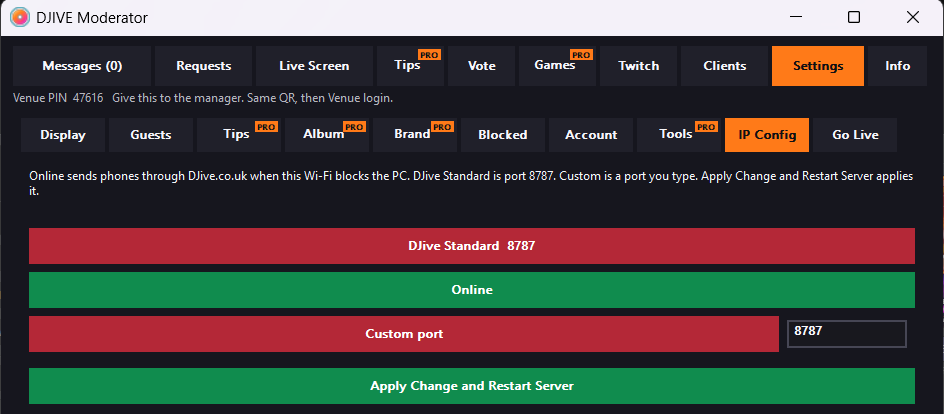
Hope this helps.. Set it like this if your having wifi issues from this point our system dose all the work
Inviato Sat 31 Oct 26 @ 5:55 pm
DJive Plugins

DJIVE Video Wall. What’s new!
Here is an update on what DJIVE has moved forward with since our Friday 30th October post.
If you already have it installed, open the booth, Info, Update. Fully quit VirtualDJ after a plugin update, then open it again.
🎧 Requests. Spotify Playlist
Inside Requests, next to Queue, there is now Spotify Playlist.
Two tabs across the booth:
- Music to Play - songs you want in the night
- Music not to Play - songs you do not want coming through
Handy for wedding DJs and anyone who likes to pre-plan the set before the room fills up. Paste a public Spotify playlist link and hit Import Spotify Playlist. Up to 100 songs. Those lists are for that session only. Song bars use an orange outline so they do not get mixed up with green Played or red Refuse.
Right-click a row to:
- search that title in your local VirtualDJ music (not Spotify online)
- mark Added to playlist - green tick, list order stays put
- mark Played on Music to Play - row turns green
- remove it
If a guest request matches Music not to Play, it never reaches the queue.
📺 TV profiles
Different venues, different TV layouts. On Settings, Display, TV, under Edit layout, you can now save a TV profile.
Type a venue name, set the boxes and the Display options you want for that room, then Save profile. Next time you are there, Load profile puts that setup back. Delete profile removes it.
Network, guest permissions, tips, and brand stay on your PC. The profile is the TV look for that venue.
🎛️ Settings tidied up
Settings is seven tabs now:
Display · Guests · Brand · Blocked · Connection · Account · Tools
Tips and Album sit under Guests. IP Config and Go Live sit under Connection. That frees space on Guests, Permissions, so everything fits properly.
On Display:
- Look has Live reactions card and Top tippers card
- TV has Moderator text (Normal / Large / Extra large)
🎵 Music Bingo. Proper night tools
This got a lot of booth love.
- Save the song list and the round settings with Save round. Load it later. Delete when you are done. You do not need the game running to save.
- Print Tickets for Music Bingo and for Bingo.
- Building the list leaves decks 1 and 2 playing. Checking the list does not kill those decks. Clips still go on 3 and 4, same volume as the first song.
- Call line / full house pauses for the check. After Claim verified or False claim, Continue game turns green on Live, plays the song again from the start, then carries on. The screen says Waiting for Host to check ticket.
- When the last prize is verified, the winner stays up for 15 seconds and the game ends.
- Song order mixes each time you start. Same list, fresh order. After a game the list stays ready.
- No timer starts off. Turn it on when you want it. On a phone: song at the top, songs just played, one call button.
- The picture stays with the deck that is playing. When the game ends, decks 1 and 2 take the picture back, and the video slider follows the crossfader again if that was on.
Bingo strips now match the game you are on. 90 is 6 tickets, 75 is 3, 30 is 2. On a 75 strip of 3, each card has a free centre, same as a single 75 ticket.
🧠 Pub Quiz, Open the Box, Prize wheel
Pub Quiz Build is clearer. Quiz, Add, Internet, Picture, Saved. Green letter is the right answer. Internet can add one question or replace the whole quiz. A picture shows on the screen and the phone. Saved keeps a quiz by name. Timers No waits until Next question.
Open the Box. Prizes start at £10, then £20, and so on. A prize you typed stays. The prize comes out of the box large, then goes back in. On the last two boxes the screen shows the prize from their own box. Left and right lists stay in the order you typed.
Prize wheel. Each wedge listed with its number. Leave a box blank and that prize stays off the wheel. Long names use two lines. The key beside the wheel grows on the one under the pointer.
🗳️ Vote
Still called Vote. A, B, C, and D down the page. A and B needed. C and D can stay empty. A long question shrinks and wraps onto two lines. Question stops at 96 characters, each answer at 28. A finished vote stays out of the side chat while Game notes in the chat is off.
✨ Holiday shoutouts
Happy birthday, happy halloween, happy christmas, and happy new year fire the birthday or the holiday backdrop. Happy on its own still does the yellow bursts.
🖥️ Booth polish
New wall defaults: chat down the right, highlight on the left, QR along the bottom.
Text boxes are dark bars. Dropdowns open as a dark list with an orange mark. Game names sit on two rows so they stop fighting for space.
✅ Free and Pro
There are still two free ways to run a night, and both have enough to get a room going.
Free with no account: shoutouts, song requests, and live reacts. Caps are there so a busy night does not run away with itself, but you still get the wall, the booth, and the QR on the TV.
Registered (free account): higher weekly caps on shoutouts and requests, plus a live poll each week. Same booth, same phones, just more headroom.
Pro unlocks the rest: guest photos, Tip the DJ, word animations, your own logo and website on the wall, the guest-page looks, and the pub games.
If you want to try the full version properly, there is a 3 day free Pro trial. One claim per email, on one computer. Enough for a proper night or two, not just a five minute poke around.
Inviato Wed 11 Nov 26 @ 8:46 pm